
In this article:
- Why most LLM context isn’t doing its job
- Pillar 1 — Codifying knowledge
- Pillar 2 — Architecting context for LLMs
- Pillar 3 — Tools for better LLM judgment
- Context engineering in practice
- Transferable principles
A GTM context OS is the layer your LLM actually uses to make judgment calls about your business — not just retrieve facts. It’s what context engineering looks like when you apply it to a whole company instead of a single coding task. Most teams don’t have one yet.
Joe Rhew describes part of the loop well: you automate everything that’s intelligence — rule-based work like list building, enrichment, persona matching, drafting against templates — and architect the system to surface only the judgment calls to humans. Then every time a human call plays out, you encode that pattern back into the system. “Today’s judgment becomes tomorrow’s intelligence.” The system gets smarter; the human layer gets thinner but never disappears.
Where I’d push back: judgment isn’t only what gets escalated to humans. Even the work in the “intelligence” bucket is full of small judgment calls. Every time an LLM enriches a list, matches a persona, or drafts against a template, it’s deciding what to trust, what to flag, what to push back on — whether you’ve equipped it for that or not. Humans have the thinking tools to make those calls. LLMs don’t, unless you give them.
Joe’s loop routes the big calls up to humans. The rest of this post is the other half — my system for enabling the small ones.
Where this post stops: pure strategic synthesis. Even the best context OS doesn’t turn a generic model into a strategist. Recent HBR research tested LLMs across seven classic strategic tensions — exploration vs. exploitation, differentiation vs. cost leadership, and so on — and found models converged on the same fashionable answers regardless of context. The researchers called it “trendslop.” Strategic judgment stays with humans, no matter how well-codified the rest is.
Why most LLM context isn’t doing its job
Most people think facts equal context. They don’t — especially not for LLMs.
Everyone already knows they should have well-structured context files. The actual problem: adding a few subheadings and more facts doesn’t mean your context is designed for those small judgment calls. Should it qualify this prospect or push back? Should it celebrate this metric or flag it as misleading? Should it follow this recommendation, or treat it as input to investigate?
Facts alone leave the LLM guessing. Context tells it what the facts mean, how they connect, what to trust, and what to question.
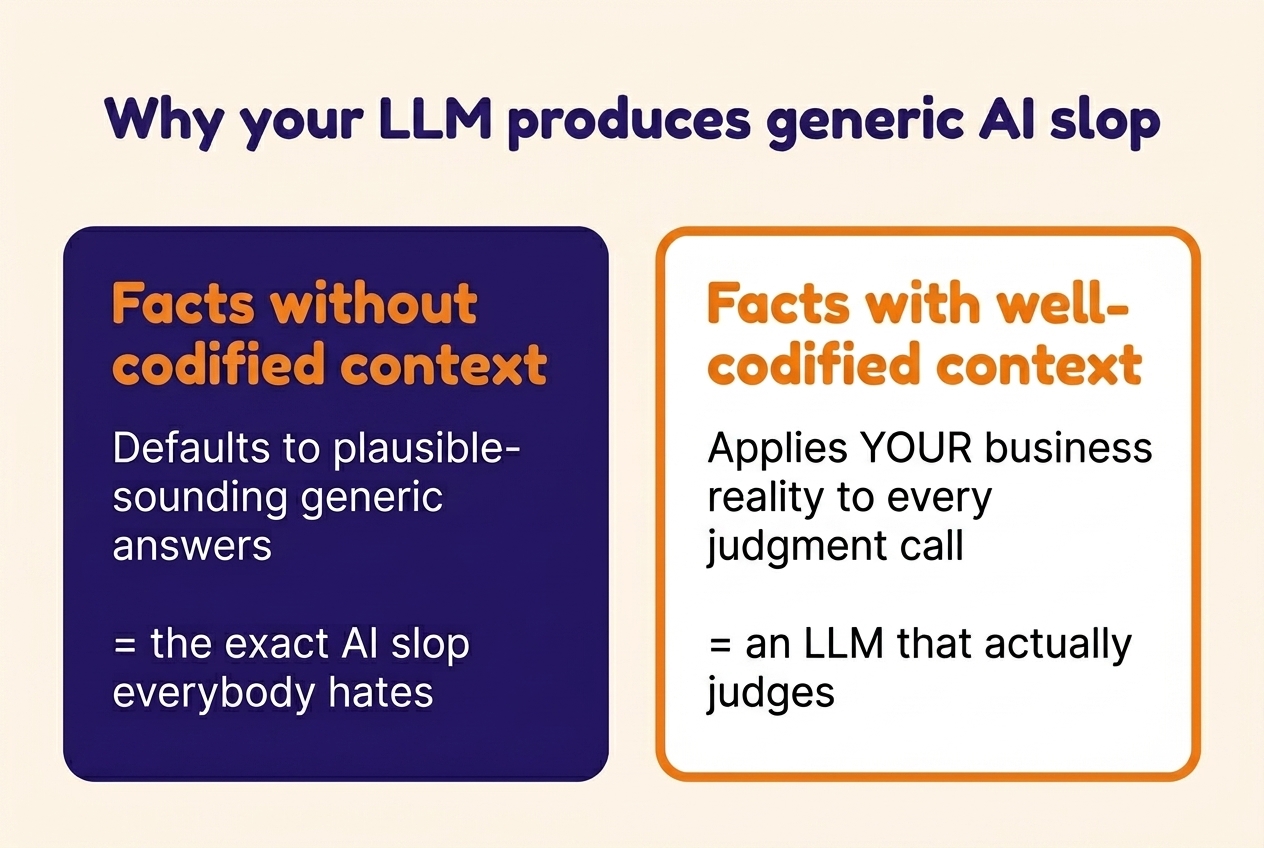
A well-functioning GTM context OS needs three things:
- Codified knowledge — how you encode what you know.
- Architecture — how the LLM finds and reads it.
- Thinking tools — how the LLM reasons about it.
A quick note on me, since the rest of this post leans on examples from how I work: I’m a fractional GTM consultant running clients’ GTM engines. I spend ~95% of my work week inside Claude Code, not in tools or UIs. To do that across multiple clients at once, every important client fact has to live in a context layer my Claude Code, my clients’ tools, and any agent I deploy can read and reason over.
The principles below apply to any knowledge work where decisions build on each other — not just GTM, not just fractional. Two things they don’t cover, which each warrant their own write-up: how to keep the system up to date as reality changes, and how to make it work across a team.
Pillar 1 — Codifying knowledge (vs. saving information)
What goes into the system is the self-explanatory part. Across clients, I include:
- Strategy. ICP, positioning and messaging, financial model, growth model, competitive context, KPIs and targets.
- Operations. Sales process, tools, team structure, roles, budget, vendor relationships, past performance, meeting notes, project logs, historical analysis and decisions.
- People. Who decides what, who executes what, expertise areas, working preferences.
- Product. Features, capabilities, roadmap, known gaps, documentation, code base (read-only).
- History. Decisions made, what was tried, what worked, what didn’t.
- The LLM’s own tooling. CLI, MCP servers, scripts, skills, hooks, credentials.
What you don’t need to codify is anything Claude can already find or derive — file paths, project structure, generic industry terms, the contents of the session you’re in — or anything that lives in another system the LLM can query directly (your CRM, Search Console, GitHub). Save the codification effort for what’s specific to your business, what you’ve decided, and what an LLM can’t infer from looking around.
The list itself is obvious. The non-obvious part is how you codify it.
Here’s what the difference looks like at a glance — before we go deep:
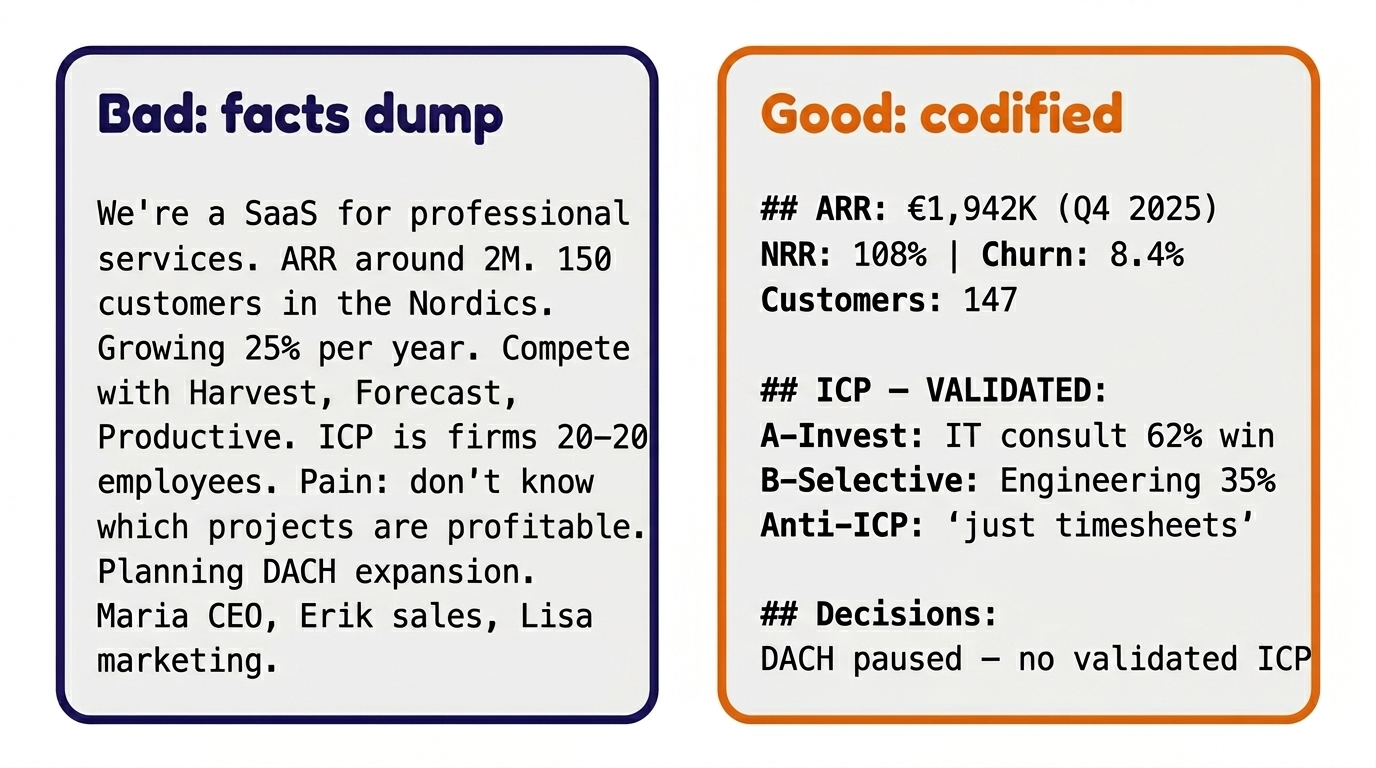
Bad context — a facts dump
Most CLAUDE.md files look something like this — every fact present, every detail flat:
We're a resource planning and project
profitability SaaS for professional services
firms. We help agencies and consultancies
track their projects and team utilization.
ARR is around 2M. About 150 customers,
mostly in the Nordics. Growing around 25%
per year. We compete with Harvest, Forecast,
and Productive. Our ICP is professional
services firms with 20-200 employees.
Main pain point: they don't know which
projects are profitable until it's too late.
We're planning to expand to DACH markets next
year. Key people: Maria (CEO, product),
Erik (sales), Lisa (marketing).
Every fact here is true. Every one is unsourced, unhierarchized, undated. The LLM has no way to know:
- Which of these are current decisions or facts vs. year-old assumptions — and when each was last validated.
- Where “around 2M” came from — a financial close, a board deck, or someone’s best guess from a meeting.
- Which competitor is actually pulling deals away — vs. which one is on the list because someone mentioned it once.
- Whether “ICP is professional services firms with 20–200 employees” is validated against data, just a guess, or a vision the team is hoping to grow into.
- Where any of this came from at all.
- What the LLM should weight more or less when these compete.
Asked to qualify a prospect, draft a page, or critique a pitch, this LLM has facts to retrieve. It has no context for judgment.
Good context — codified for judgment calls
Same facts, different shape. Every number sourced and dated, every claim labeled validated or hypothesized, decisions time-stamped:
## Teamflow Oy — Context
Resource planning & project profitability SaaS
for professional services.

ARR: €1,942K (Q4 2025) | NRR: 108%
Churn: 8.4% | Runway: Q2 2027
Customers: 147 (132 Nordics, 15 DACH pilot)
Full financials → business-profile.md

Team:
Maria (CEO — strategy, pricing)
Erik  (Sales — deals, pipeline)
Lisa  (Marketing 0.6 FTE, €3K/mo)
Mikko (Product — former consultant)

# ICP — VALIDATED (CRM 2025: 38 won + 22 lost):
A-Invest:    IT consultancies   62% win
           Design agencies    55% win
B-Selective: Mgmt consultancies 38% win
           Engineering        35% win
C-Inbound:   Law firms          11% win
           (product capability mismatch)
Anti-ICP:    "just need timesheets"
           single-user buyer
           custom-tool seekers
Full ICP & quotes → customer-intel.md
Messaging        → positioning-messaging.md
Competitive      → competitive/

# Key decisions:
DACH paused until Q3 2026 — no validated ICP
Law firms = distraction — 11% win, 3x effort
Sales-assisted > product-led — 48% vs 3.5%

# History & analysis → project-log.md
Now every fact is sourced and dated, segments are tagged with validated win rates, and decisions are time-stamped. Pointer files replace duplicates. The same LLM, asked the same questions, now produces:
- “This is a 62% win rate segment” — instead of “this looks like a fit.”
- “Procurement takeover — classic anti-ICP signal for engineering” — instead of generic risk language.
- “NRR 108% looks healthy, but what’s the expansion vs. price-increase split?” — instead of treating NRR as good news.
Five principles for codification
These are the practical context engineering principles for business teams — each pairs a fact-dump example with the codified version.
| Principle | Fact dump | Codified context |
|---|---|---|
| Source every fact | ”3M ARR" | "3M€ ARR, FY25 close (financial_model.xlsx)“ |
| Codify the context, not just the data | ”NRR 115.6%" | "NRR 115.6% in 2025, 55% driven by price increases in Tier 1 ICP, not organic seat expansion and upgrades” |
| Validate claims against data | ”ICP is mid-market finance" | "Tier 1 ICP 60% win rate (181 inbound deals, 2024–2025) vs. Tier 2 ICP win rate 27% (145 inbound deals, 2024–2025)“ |
| Separate validated from hypothesized | ”ICP: planning consultancies and cities" | "Validated ICP: planning consultancies; hypothesis (not yet pressure-tested): cities” |
| Make information actionable | ”We sell to finance" | "Finance Tier A — Invest in GTM. Bundled entry pattern has best win rates (60%) vs. single use case (25–35%). Back door: if procurement enters, downgrade.” |
Pillar 2 — Architecting context for LLMs
Codification is what goes in. Architecture is how the LLM finds and uses it. Four requirements:
- Findability — can the LLM locate the right file without searching the whole tree?
- Readability — can the LLM understand what it’s looking at?
- Version history — can the LLM trust what it’s reading, and roll back what it broke?
- Instruction compliance — does the LLM actually follow the rules you set?
Findability — uniform structure, pointer files
Findability is the first thing the architecture has to deliver — before the LLM can use anything you’ve codified, it has to know where to look. The LLM should locate the right file via pointers, not search. That means:
- Uniform folder structures across clients (or across teams). The LLM doesn’t have to learn a new geography for every new directory.
- Naming conventions. Lowercase-with-dashes, predictable suffixes (
CONTEXT.md,business-profile.md,project-log.md). - Index/pointer files at every directory level. A
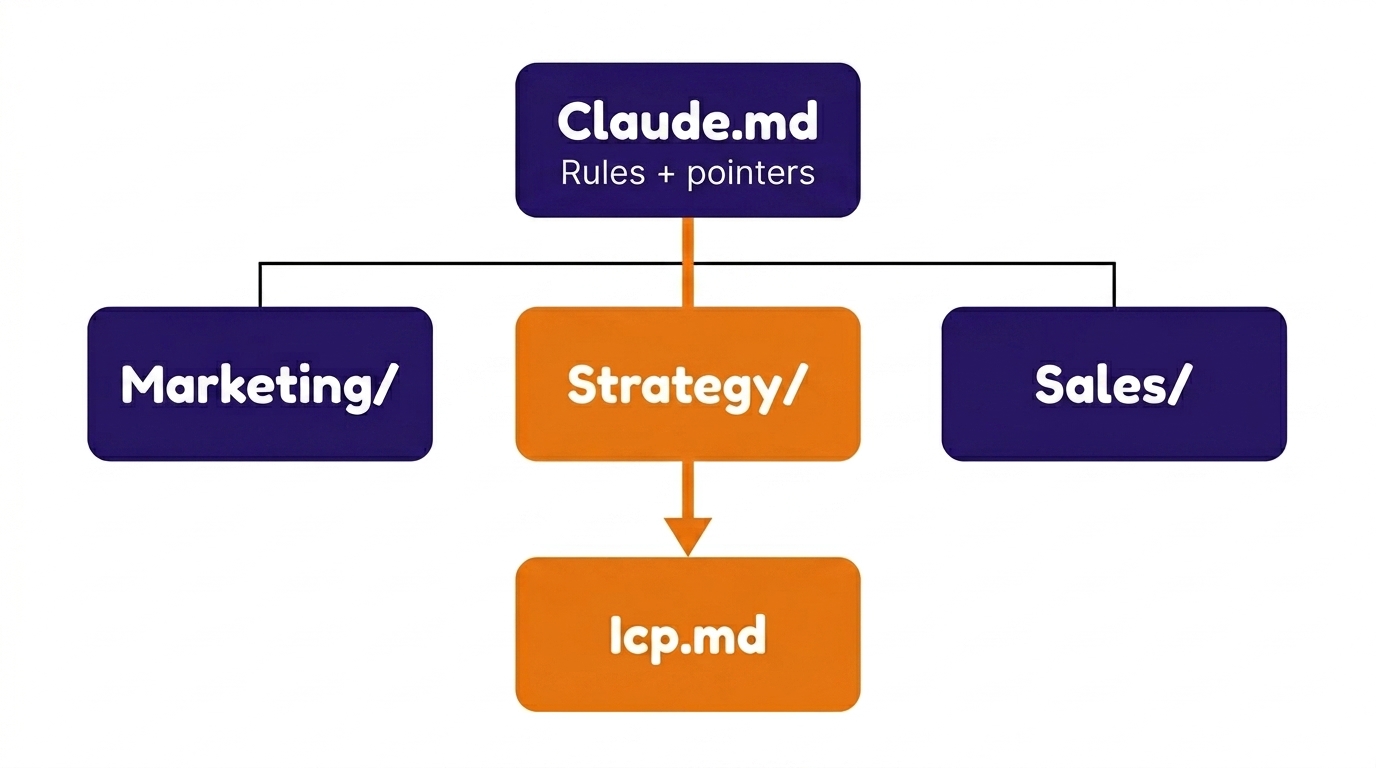
CLAUDE.md(orREADME.md) at every folder that says: here’s what’s in this directory, and here’s where to look for what. - One source of truth per fact. Never copy a fact into two places. Point to the source.
Two folder patterns I run — solo / fractional (left), or full in-house team (right):
SOLO / FRACTIONAL

CLAUDE.md (rules + pointers)
├── Client A/
│   ├── CLAUDE.md
│   ├── business-profile.md
│   ├── customer-intel.md
│   └── project-log.md
├── Client B/
│   ├── CLAUDE.md
│   └── ...
└── Own Business/
  ├── CLAUDE.md
  ├── frameworks/
  ├── templates/
  └── operations.md
TEAM / IN-HOUSE
CLAUDE.md (rules + pointers)
├── strategy/
│ ├── CLAUDE.md
│ ├── icp.md
│ ├── positioning.md
│ ├── messaging.md
│ └── competitive/
├── sales/
│ ├── CLAUDE.md
│ ├── playbooks/
│ ├── transcripts/
│ └── battlecards/
├── marketing/
│ ├── CLAUDE.md
│ ├── content-pipeline/
│ └── seo/
├── product/
│ ├── CLAUDE.md
│ ├── features.md
│ └── roadmap.md
├── analytics/
│ ├── CLAUDE.md
│ └── dashboards/
├── finance/
│ ├── CLAUDE.md
│ └── unit-economics.md
└── team/
├── CLAUDE.md
└── onboarding/Same architecture, different axis. Solo or fractional: the unit is the client. In-house team: the unit is the function. Either way, a CLAUDE.md at every folder level lets the LLM follow pointers down instead of scanning the whole tree.
Building and maintaining the memory layer that lives alongside this — how the LLM contributes to its own context, where tabular data goes, when to graduate beyond files — is essential, and I cover it in the companion post: Persistent memory for Claude in knowledge work.
Readability — format choice matters
LLMs read certain formats natively. Others, not so much.
Readable — formats the LLM can use directly:
- Markdown (
.md) for prose to reason about. Both humans and LLMs read it. - JSON for state the AI should update surgically. Structured, parseable, exact field updates without reflowing prose.
- CSV / SQLite for tabular data to query. Precise queries instead of fuzzy semantic matching.
Unreadable — formats the LLM either skips, eats tokens converting, or hallucinates around:
- Native Google files —
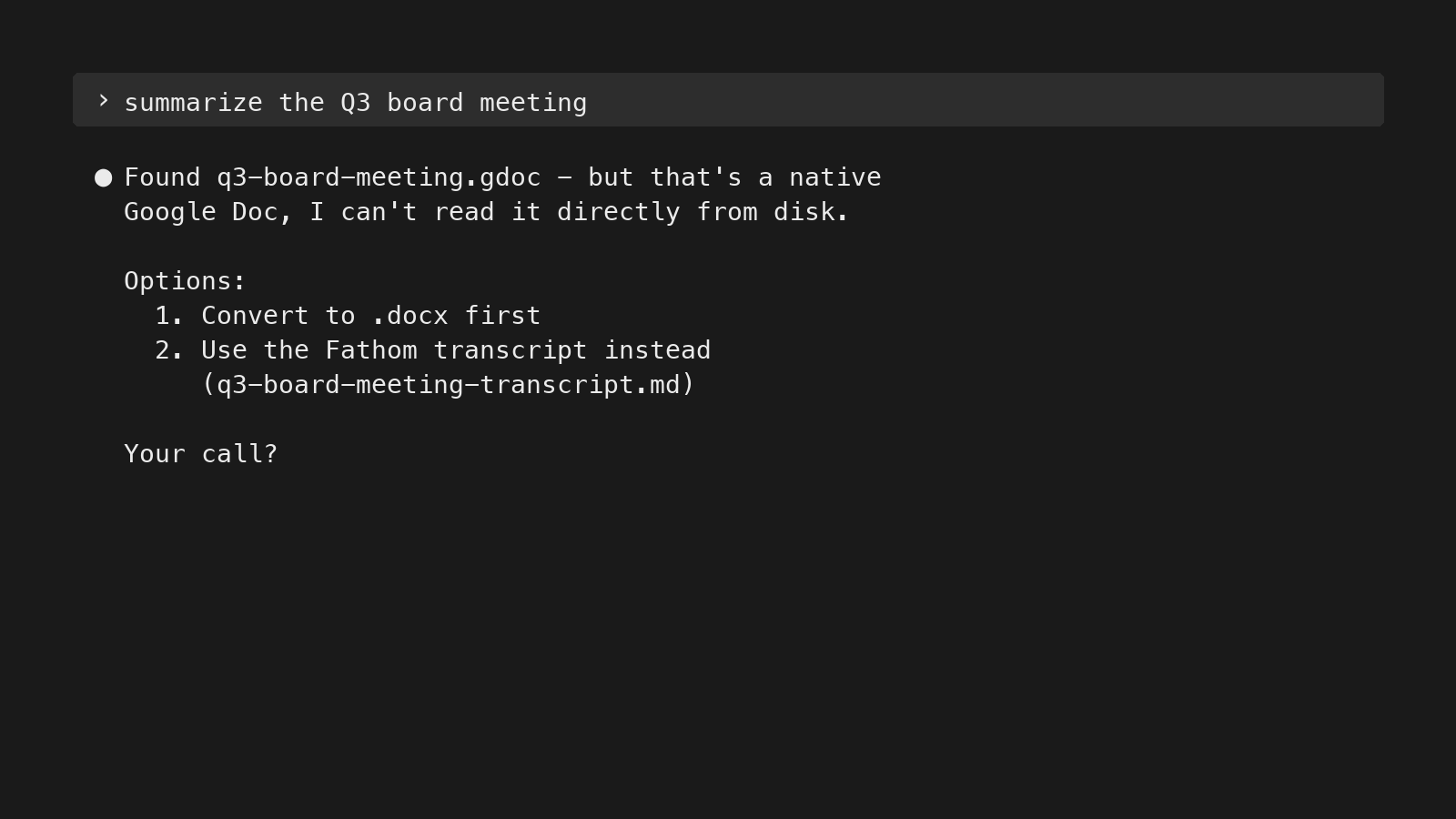
.gdoc,.gsheet,.gslides. Proprietary formats that aren’t directly readable from disk; the LLM needs to convert them first via the Drive API or a tool like rclone. If you don’t make the conversion path explicit, the LLM may try to read the file, fail silently, and answer from surrounding context instead. - Image-only or scanned PDFs. No text layer, so the LLM can’t extract content without an OCR step.
- Slides with content rendered as images. The text inside the slide is part of the image, not extractable.
- Audio or video without transcripts. No text at all. Has to be transcribed before it’s useful.
A model asked to read an unreadable file will sometimes hallucinate from surrounding context instead of saying “I can’t read this.” Convert at ingestion, or avoid the format.
Where it gets trickier: sources that aren’t unreadable in format, but block programmatic access. Sites that detect and block automated user-agents (most major social platforms, some news domains). Internal SaaS dashboards behind a login. Pages that throttle or refuse unrecognized clients.
Claude Code can connect to tools beyond WebFetch — for instance, in my setup it has access to Perplexity’s search API, Apify actors for social platforms, and SearXNG for queries that bypass user-agent blocks (via MCP servers and custom scripts). But even when those tools are connected, Claude won’t always reach for them on its own. When WebFetch fails, the default is to give up or hallucinate from surrounding context, not to try the next tool. If you want Claude to fall back to the alternative path, surface it in your rules.
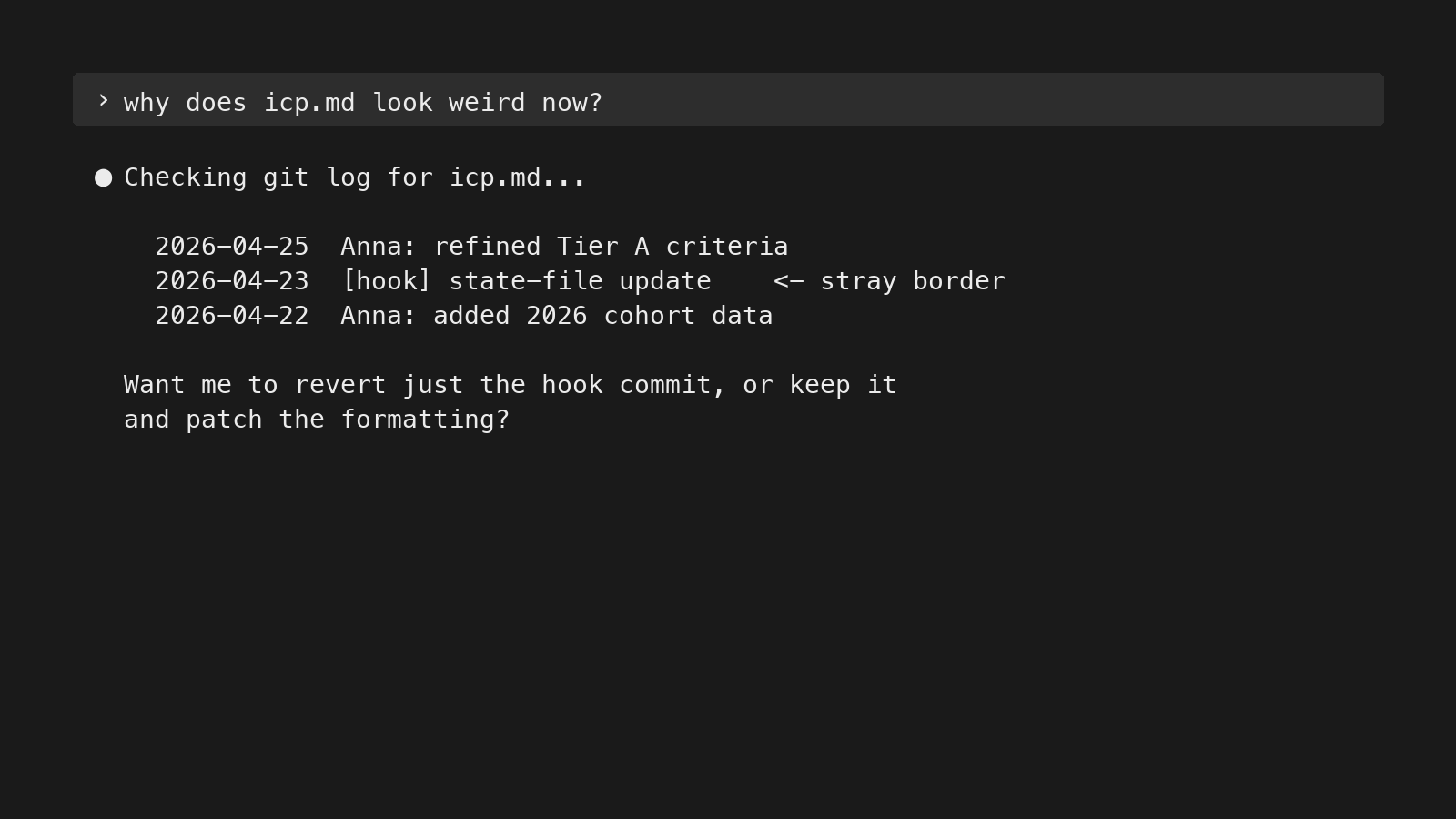
Version history
An LLM that edits its own context layer needs the same version discipline you’d give a codebase. Three reasons:
- Roll back when the LLM breaks formatting or deletes something it shouldn’t.
- Audit trail — see what changed, when, and whether a human or the LLM made the change.
- Distinguish current truth from historical state — the same fact can have different correct values at different points in time.
Even if you’re working from human-first locations like Google Drive, use Git for the most important parts of the knowledge layer — not just code. Knowledge bases are where decisions live; treat them like source code.
Instruction compliance
LLMs reliably follow about 150 instructions before quality starts to degrade. Past that, you’re not adding context — you’re crowding it.
Three mechanisms keep instruction load small and compliance high:
- Hooks (enforced compliance) — shell scripts that fire on specific events. A pre-tool-use hook that blocks dangerous commands. A session-start hook that injects the right context. A “must read fully” hook that prevents the LLM from skimming a long file. Hooks aren’t asking the LLM to behave — they’re enforcing.
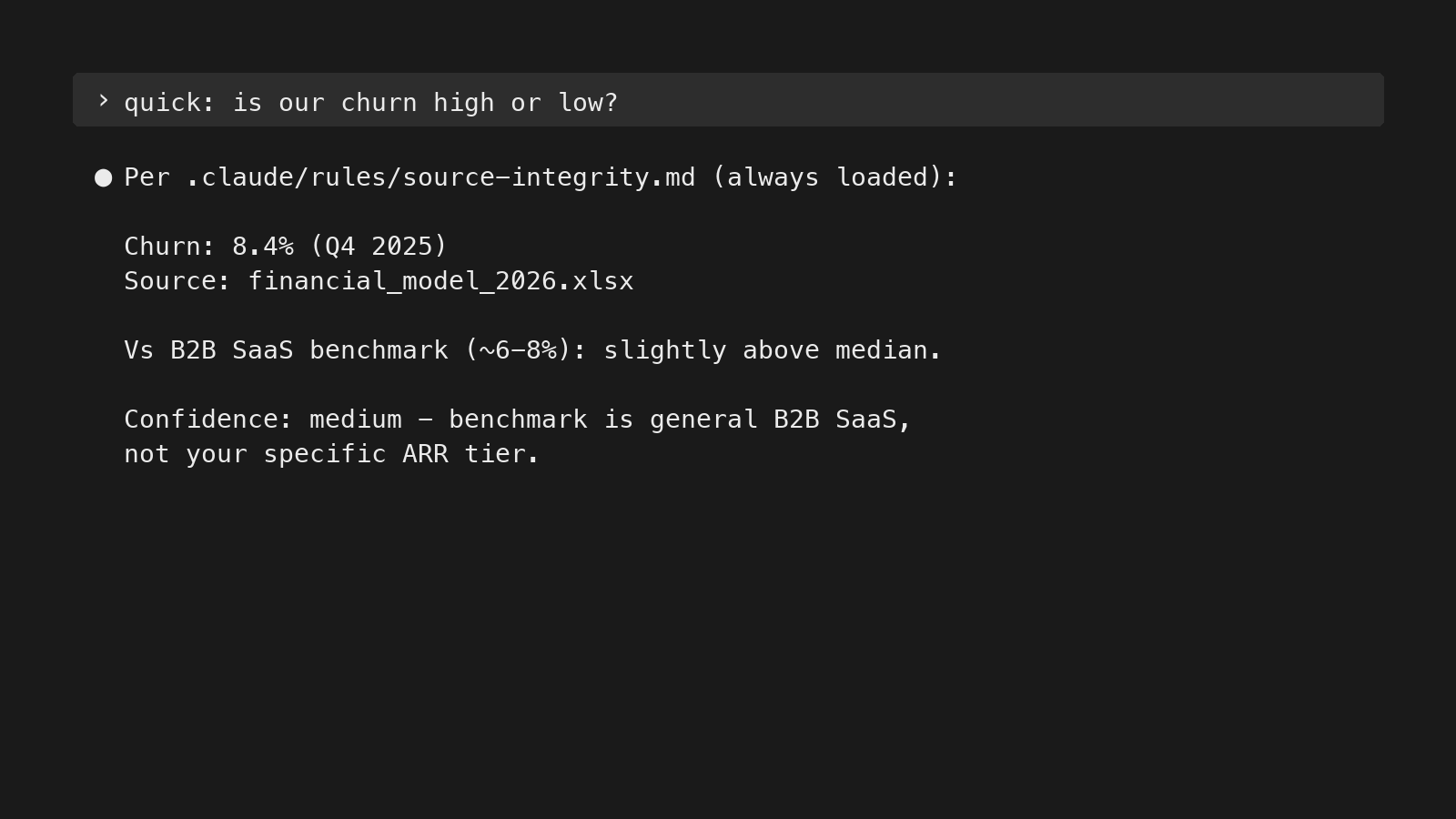
- Rules (behavioral) — always loaded, but easily skipped if there are too many. Keep minimal. The test for inclusion: is this relevant to 80%+ of sessions? If no → reference file with pointer.
- Reference (task-specific) — loaded on demand. Catalogs, system inventories, detailed how-tos. Live in
.claude/reference/.
In practice, this cut my effective instruction load by about 40%, and the LLM gets more compliant on the rules that remain.
Pillar 3 — Tools for better LLM judgment
Codification is the input. Architecture is the access. Thinking tools are the LLM’s ability to judge what it reads.
This pillar comes down to telling the LLM what to trust on the way in, and how to label what comes out — encoded in the rules so it doesn’t have to re-derive them every session.
In my setup, most of these live as rules — advisory, not enforced. The LLM can still skip one if context gets crowded. A few can be promoted to hooks (e.g., “always read the full file before answering” is enforceable; “ask before editing CLAUDE.md or running paid tools” is too). The cognitive ones — trust hierarchies, bias-catching, confidence marking — can’t really be hooked. They depend on rules plus good Claude Code habits plus periodic spot-checks on the outputs.
Trust hierarchies
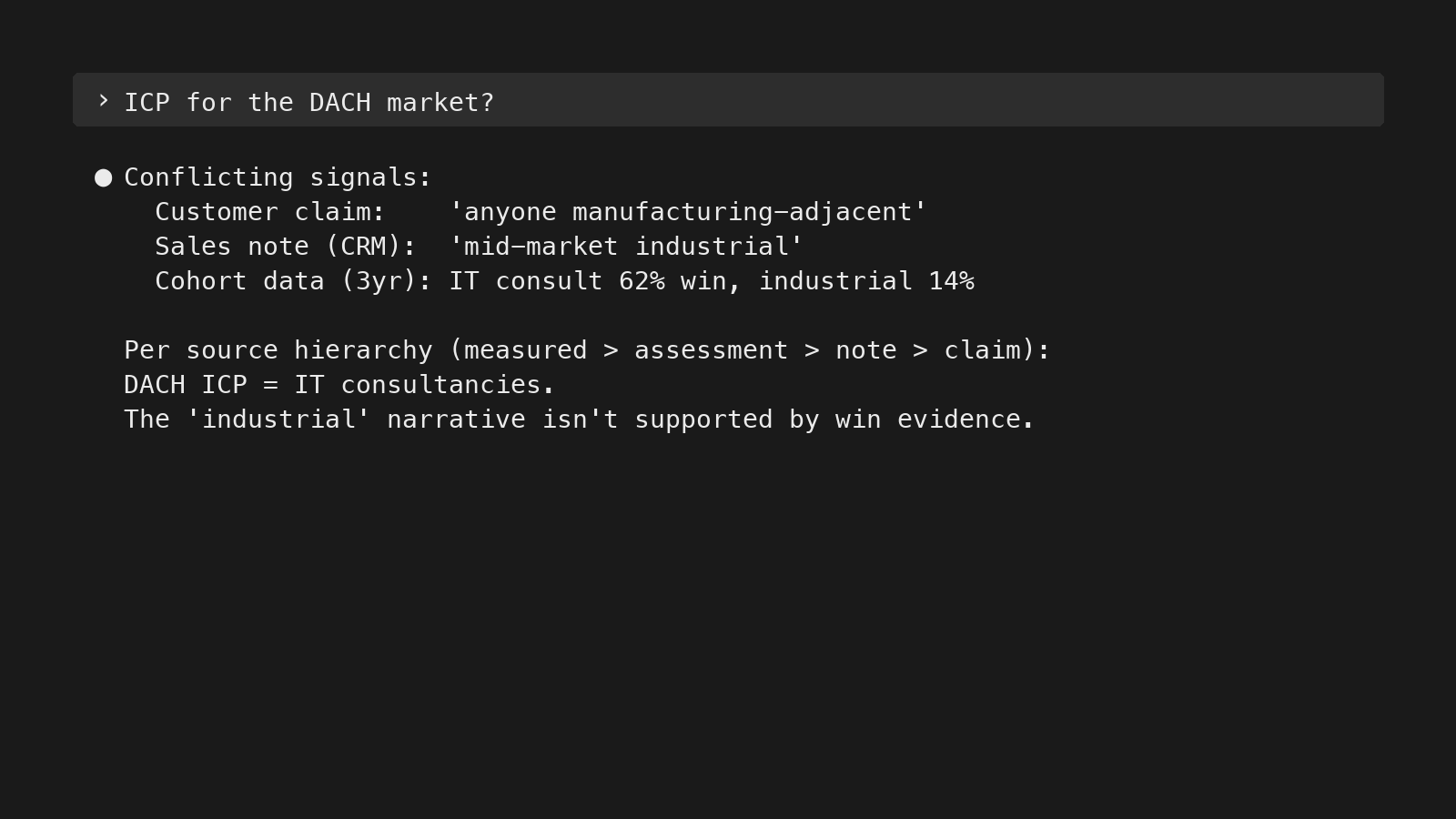
Every time the LLM has to choose between competing inputs — a customer claim vs. measured data, the CEO’s opinion vs. a Reddit thread, your own assessment vs. the AI’s general training — it falls back on whichever hierarchy you’ve encoded. Without one, it averages everything. Five hierarchies I encode in my rules:
- File hierarchy. Constitution (always-loaded rules in CLAUDE.md) > context files (per-client knowledge) > memory (auto-extracted session logs) > project logs (historical context). When two files contradict, the one higher in this hierarchy wins.
- Data sources. Measured data > own assessments > curated notes > auto-transcripts > customer claims. Customer claims (what someone said in a sales call) are input to investigate, not conclusions to act on. “We need more materials from marketing” is the default salesperson answer — the LLM should investigate before drafting the materials.
- Expertise. Domain expert > you > AI’s general knowledge > web search. If the client’s CEO, head of sales, or head of product said something, that overrides the AI’s training data. Defaulting to “what the average B2B SaaS company does” is why most generic AI advice is unusable for real GTM work — the average doesn’t run any specific company.
- First-order sourcing. Trace claims to the primary source — the system, not the person who reported it. A salesperson saying “the dashboard shows X” is two layers away from the dashboard. Pull the dashboard.
- Version authority. Working documents (strategy docs, client briefs, in-flight analyses) — the latest version always wins. Research files (Manus runs, Perplexity research, competitive analyses) — newer rounds don’t auto-supersede older ones; different rounds may cover different angles. Tell the LLM the difference, or it will treat all files the same.
Output guardrails
Trust hierarchies cover what the LLM should believe coming in. The two tools below cover what comes out — catching the biases the model slips into while reasoning, and labeling its conclusions so you know what’s solid vs. speculative:
- Naming failure modes. Confirmation bias. Benchmark anchoring. Definiteness escalation. Counterfactual confidence. Self-referential sourcing. Cascading inference dismissal. These aren’t abstractions — they’re concrete failure modes the LLM falls into without explicit instruction. Each one in my rules is paired with a corrective: confirmation bias → actively seek disconfirming evidence; definiteness escalation → don’t upgrade “might” to “does” without new evidence. Naming them is what makes them catchable.
- Confidence marking. Every output gets labeled: confirmed fact, inference, hypothesis, needs investigation. Source trust is about inputs; confidence marking is about outputs. The LLM knows the difference between “customers in segment X have a 62% win rate (CRM data, 38 deals)” and “customers in segment X probably have higher LTV (inferred, not measured).”
Context engineering in practice
The point isn’t a tidy file structure. It’s what the LLM does with it. Context engineering examples in practice — same model, same input, different context, different output.
Sales call intelligence
What changes when codified context is loaded onto a sales-call transcript? Same 42-minute discovery call, run two ways.
Without context:
A 42-minute discovery call. Two participants
from the prospect side discussed their
compliance reporting workflow and audit-trail
requirements. They currently use spreadsheets
and SharePoint. They expressed interest in
seeing a demo. Next steps: send pricing and
schedule follow-up.
That’s a summary — accurate, but utterly useless.
With context loaded — ICP tiers, validated win-rate segments, anti-ICP signals, messaging pillars, competitive context, recent decisions:
CLASSIFICATION
PROSPECT-001 · regulated_reporting · Tier A
Bundled compliance + IT entry — 47% win pattern
Both champions aligned, audit-deadline urgency
No anti-ICP signals
Quote at 32 min: "this is exactly what
we're missing"

RECOMMENDED ACTIONS
1. Reference the upcoming audit deadline in
 the pricing follow-up
2. Send integration-features case study to
 the IT Security Lead
3. Push for IT Director attendance at next demo
4. Position with 47% win-rate cohort in proposal
5. Watch for procurement signals

DEAL ASSESSMENT: STRONG SIGNAL
That’s intelligence. It classifies (Tier A), pattern-matches against known outcomes (47% win rate for the bundled-entry profile), surfaces what landed (the 32-min quote), notes what’s missing (IT Director not yet involved), and turns all of it into specific next actions — not just a generic deal-stage update.
The transformation isn’t AI getting smarter. It’s the same model reading the same transcript, but with codified context to compare against.
Across 500+ calls and counting, the system surfaces patterns — emerging use cases, recurring objections, messaging that lands vs. messaging that fizzles. Feedback loops emerge. The knowledge base updates from its own outputs.
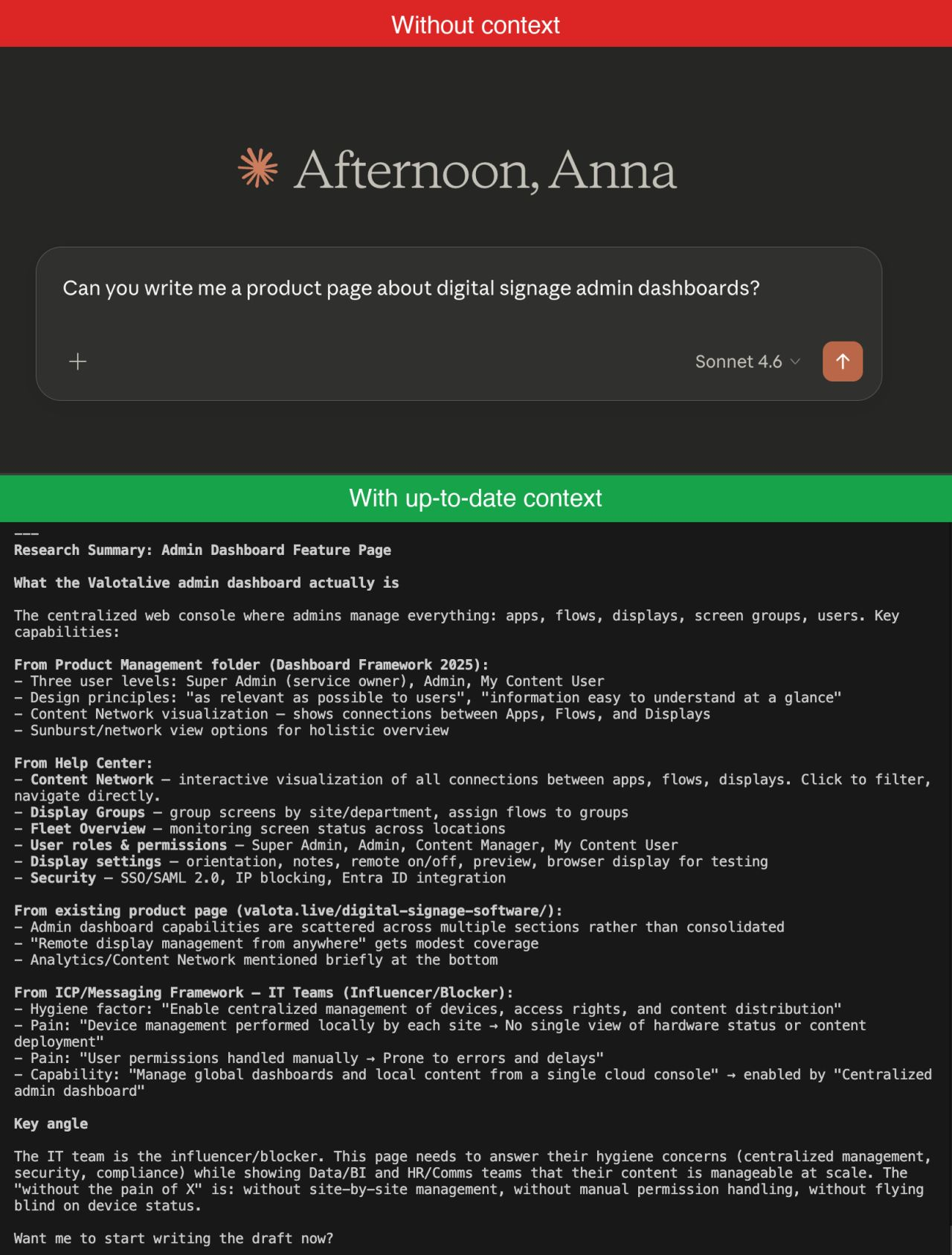
Product page in 20 minutes
The same architecture powers the agentic content workflows I run for clients. Take a product-page draft.
What the agent pulls in:
- The codified ICP and messaging framework
- Live product documentation and Help Center (to verify every claim before drafting — no fabrication)
- Search Console data on which queries already get traffic
- The internal sitemap (to suggest where to link in and out)
- Brand and tone notes
- Competitive positioning
What the agent runs:
- Researches the brief against the codified knowledge base and the live product/SEO data
- Drafts against a post-type template
- Generates brand-consistent images using the brand guidelines and reference library
- Runs a quality-control loop until the draft passes
- Publishes to the CMS via API as a draft (returns a URL for human review)
- Proposes internal links from existing site content with anchor-text suggestions
About 20 minutes from “we need a page on X” to a draft I can review. What stays human: deciding which page to write, reviewing the draft, approving the internal links — maybe 5 minutes of actual decisions. The rest is the codified context doing what would otherwise be a 2–3 hour context-gathering exercise across five tools.
For the full architecture — failure modes, what gets verified vs. drafted, and the parts that surprised me — I wrote it up in Agentic AI workflows: from content idea to published page →.
Other day-to-day uses
Same architecture, different shapes. More day-to-day tasks the codified context layer makes nearly free:
- Performance status checks. “How’s our SEO doing? How’s our outbound? How’s the email sequence campaign?” Informed answer without opening three tools. The LLM pulls the relevant data, compares against the goal, and reports.
- Full-stack audits. I once analyzed 78 email sequences against a messaging framework in a single session. Without codified messaging, the same analysis is a multi-day project. With it, the LLM runs the comparison and surfaces patterns at scale.
- Catching contradictions and drift. When a new analysis assumes one fact and a recent decision assumes another, the LLM flags the conflict. “This positioning assumes the DACH ICP — but DACH was paused in January.” Knowledge bases drift; codified context and trust hierarchies catch it before the drift produces a wrong answer downstream.
The unlock isn’t writing faster. It’s that the context-gathering — usually the slow part — is gone.
Transferable principles
Stepping back, the principles transfer to any knowledge work where decisions build on each other — not specific to fractional consulting, not specific to GTM:
- Codify what you know into LLM-readable formats. Not just the facts, but the context that makes those facts actionable. Markdown for prose, JSON for state, CSV/SQLite for tabular.
- Make it findable and readable for LLMs. Uniform structure, pointer files, navigation maps at every level, formats the LLM can read natively.
- Encode and enforce desired actions to enable better judgment calls. Trust hierarchies for inputs (measured > assessment > notes > transcripts > claims). Hooks for enforced compliance. Rules for behavioral defaults. Reference for task-specific depth. Confidence marking for outputs.
- Build feedback loops so corrections stick. Manual and automated. Session-end automation, decisions promoted to context, indexes maintained as the knowledge base grows.
- Audit not just the knowledge, but the system that holds it. Knowledge bases decay if you don’t actively prune. So do the rules, the hooks, and the reference layer.
- Use correct prompts for the purpose. Specific verbs trigger specific behaviors. “Verify” beats “read documents.” “List what you know about X” beats vague “analyze.” The right verb is half the instruction.
The instinct is to start with the fancy version — vector DB, agentic retrieval, multi-agent setups. Almost never the right starting point — I covered why curated markdown beats RAG for judgment-heavy work in Persistent memory for Claude in knowledge work. Add complexity when the simple thing breaks — not before.
A version of this is what I gave as a talk at the Claude Code Meetup Helsinki on April 27, 2026 — this post is the written-down version. The original slides are here.
”I don’t use AI to replace thinking. I use it to never think the same thing twice.”
Building a context OS is one piece of how a fractional GTM lead systematizes a B2B SaaS go-to-market function. For how that broader engine fits together, see the three stages of GTM maturity and the AI workflows that ride on top of it.

Anna Ursin
Fractional GTM lead for B2B SaaS companies at €1M–10M ARR. I help founders build go-to-market engines that actually connect to pipeline — instead of random acts of marketing. More about me
