In this article:
- Why most persistent memory setups are over-engineered
- Knowledge work needs a different memory shape
- How I built persistent memory for Claude in three layers
- How to choose a memory architecture for Claude
- The same memory mismatch shows up in GTM stacks
- Where to start with Claude persistent memory
How do you give Claude memory that survives across sessions, when your work is knowledge work — analysis, decisions, strategy — and not coding? This post walks through the three-layer setup I run across four B2B SaaS GTM clients, why curated markdown beats vector databases for this kind of work, and how to choose between six common memory architectures.
Why most persistent memory setups are over-engineered
Out of the box, Claude is amnesiac between sessions. Every conversation starts from zero. If your setup doesn’t carry the important stuff from one session to the next, you’re re-explaining the same context every time, and the output is worse for it. So persistent memory matters.
But persistent memory is a category, not a solution. How you build it matters more than whether you build it — because how you build it has to match the type of work you do, and this is where most people get stuck. Engineers and non-engineers alike.
The default instinct is to reach for the most advanced solution: vector database, embeddings, RAG pipeline. Engineers reach for it because they can. Non-engineers reach for it because we assume the fancy thing must be the right thing — or we don’t realise simpler options exist at all.
For most of the work I do, the fancy version would be the wrong shape. Here is why, what I use instead, and how to tell which shape your own work needs.
A note before going further: I’m a fractional GTM consultant. I run B2B SaaS GTM engines — analysis, decisions, partner management, content, outbound, SEO. I work with four retainer clients at a time. Roughly 95% of my work happens inside Claude Code rather than in tools or UIs. The reason that’s possible at all is a persistent memory layer that lets me pick up where the last session left off, on every client, without re-explaining who they are.
Knowledge work needs a different memory shape
The right shape of memory depends on the shape of the work — and knowledge work isn’t one thing. Different kinds need different memory shapes.
The two patterns worth contrasting first — because confusing them is what produces the vector-DB-by-default instinct — are large-corpus retrieval and judgment-heavy work:
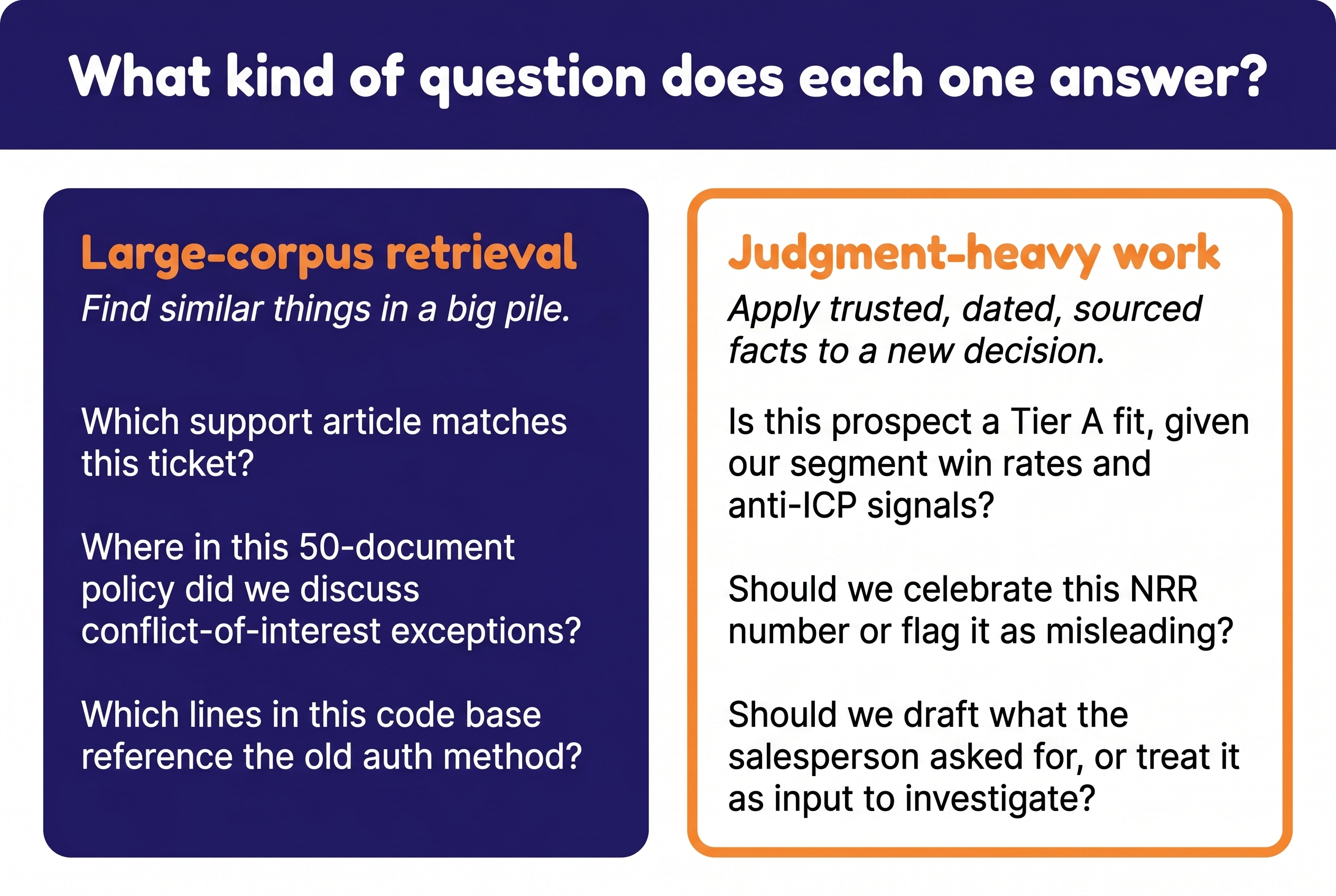
Large-corpus retrieval. You have a lot of documents and you need to find the relevant slice for a specific question. “Which support article matches this ticket?” “Where in this 50-document policy did we discuss conflict-of-interest exceptions?” “Which lines in this code base reference the old auth method?” The work is find similar things in a big pile. Semantic similarity is exactly what you want. This is where vector databases and RAG actually shine.
Judgment-heavy work. You make decisions where new decisions build on previous decisions. The same fact has different weight in different contexts. What you don’t include matters as much as what you do. Source attribution, dating, and trust hierarchy decide whether a fact is a conclusion or just an input to investigate.
Most of what I do is judgment-heavy. A typical question: “Is this prospect a fit, given everything we know about this client’s ICP, the segment win rates from the last three years, the messaging that’s tested, and what’s already been ruled out?” That isn’t find similar things. That is apply trusted, dated, sourced facts to a fresh decision, in the right order.
A semantic search index over a pile of meeting notes and Slack threads cannot answer this. It will surface the closest-sounding text, regardless of whether the source is the CEO’s measured CRM data or a salesperson’s mid-call gut feel. Two facts can sound similar and have completely opposite weight — and the LLM has no way to tell, because the embedding doesn’t carry that.
You don’t fix this by tuning the retrieval. You fix it by changing the shape of the memory.
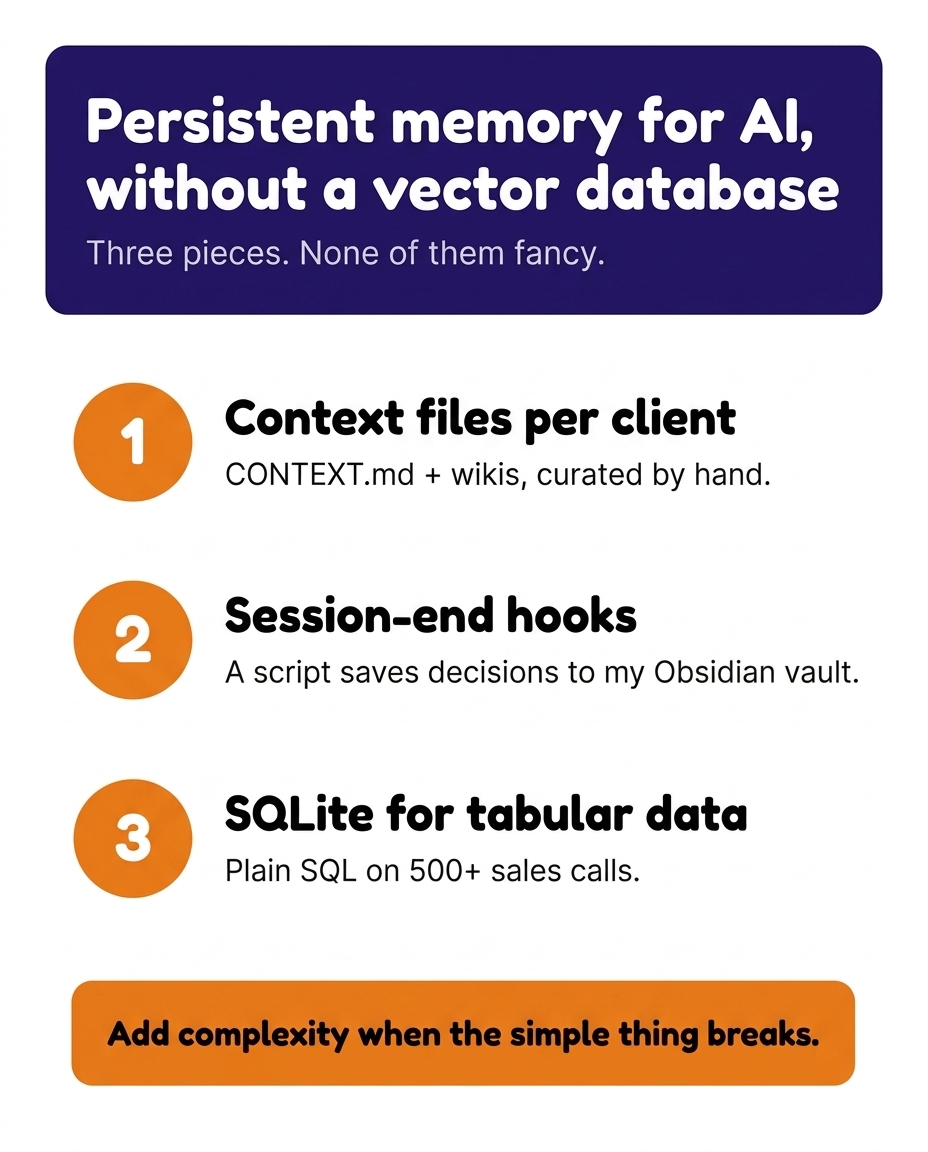
How I built persistent memory for Claude in three layers
This isn’t a finished system — but what’s there now does the actual job.
| Layer | Shape | Solves for |
|---|---|---|
| Curated context | Hand-written markdown — context files loaded every session + a deeper queryable wiki per client | Judgment context that compounds across sessions |
| Structured metadata | Rows and columns — SQL-queryable | Count, filter, group over pre-extracted attributes |
| Full-text index | Ranked keyword search over raw prose — FTS5 | Finding past work across thousands of unstructured sessions |
1. Curated markdown for judgment context
Every client has two layers of curated markdown.
The top layer is a small set of context files — CONTEXT.md, business-profile.md, customer-intel.md, project-log.md, and a handful of others depending on the engagement. These are loaded at the start of every session. They carry what I need at hand on every task: who the client is, what the ICP looks like, what got decided recently, what’s open.
The deeper layer is a per-client wiki — history, open questions, prior research, decision logs, full analyses that I don’t need at every session but want one pointer away when the conversation goes there. The wiki is queryable on demand: a question like “what did we conclude about pricing for the manufacturing segment last quarter?” lands the LLM in the right wiki page rather than expanding the always-loaded top layer until it’s noise.
Both layers are hand-written and hand-pruned. Hand-pruning is the entire point. Choosing what goes in — and what stays out — is the actual work. No embedding pipeline can do that for me, because the judgment lives in what I choose to leave out, and that judgment is different at the top layer (what does the LLM need every time?) than at the wiki layer (what do I want to find again later?).
A separate personal research library sits alongside the client wikis — articles, tools, frameworks I’ve collected across engagements. This one is a hybrid: Claude captures resources, writes metadata, and generates indexes, but I still gate what goes in. Not fully hand-curated, not fully agent-curated — somewhere in between.
Without this layer. Ask Claude “summarize this call and flag any concerns” with no client context loaded, and you get a surface-level recap — engineering consultancy, 50-person team, uses Excel today, wants a follow-up demo. The “concerns” it flags are generic ones any LLM would surface, not ones drawn from your own patterns across actual deals.
Ask “draft a cold email to [segment]” and you get an email that could have been written for any company, in any segment, in any year.
Start session two on the same client with “where were we?” and either re-explain what you decided three hours ago or risk Claude proposing the option you already ruled out. Multiply that across four clients and a few hundred sessions a quarter, and the cost of re-explanation is most of why “AI saves you time” turns out to be aspirational for a lot of people.
With this layer. Ask the same question and you get: “Tier B — engineering consultancies, 35% win rate. Concern: contact is in internal comms, an anti-ICP role. Deals from this entry point stall at the budget conversation.”
Ask “draft a cold email to manufacturing” and the email is built around the messaging pillar that’s actually tested, with the entity-linking framing that’s pulled the strongest reactions in real calls, and not the angle you tried last quarter that converted at 0.3%.
Start session two and Claude already knows that the manufacturing segment got deprioritised this morning, that the open question on pricing for the engineering vertical is sitting in the queue, and that the call notes from the 11am with the IT consultancy prospect are filed. The next thing you say is the next thing you actually need to say, not the recap.
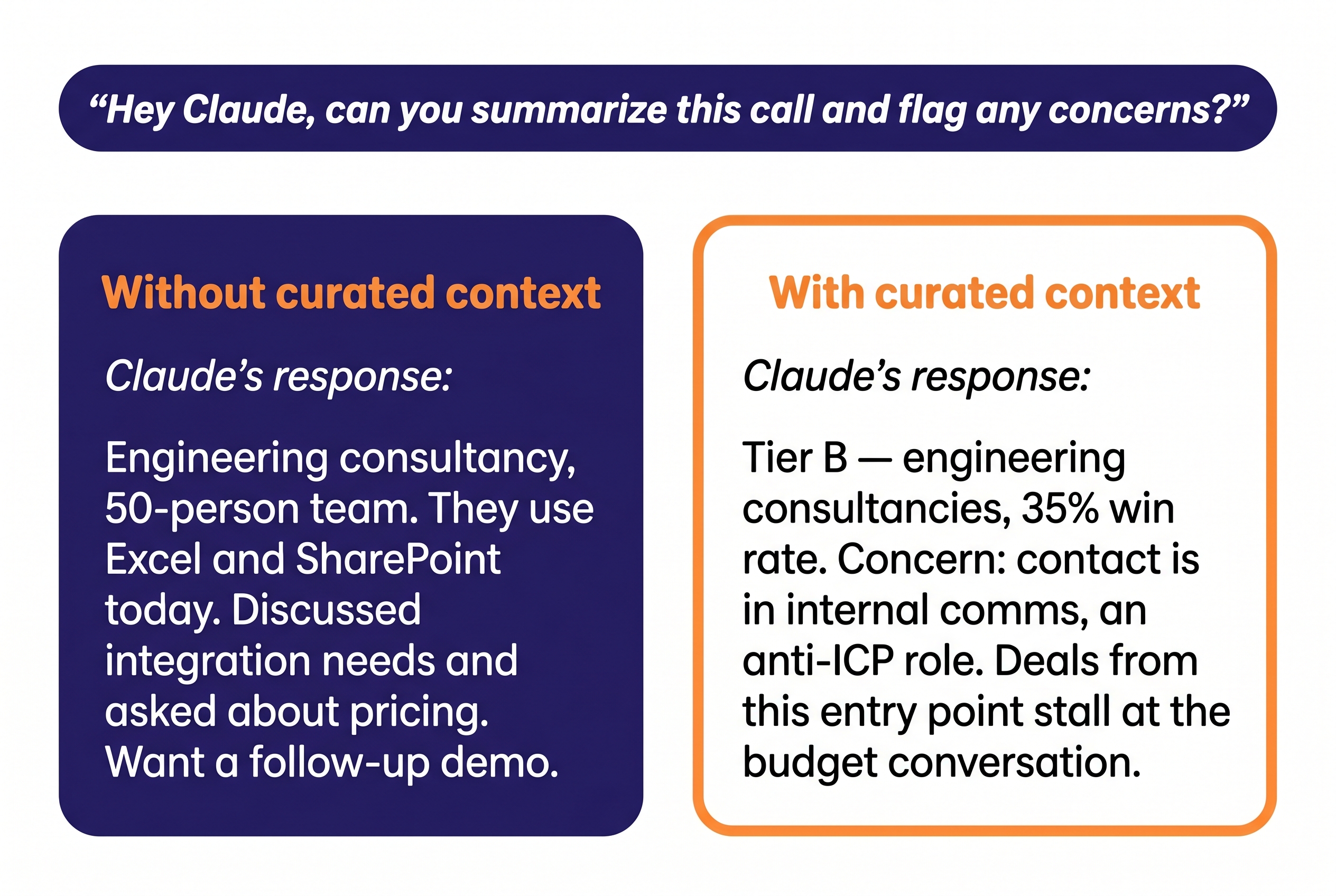
A small example. The CRM has dozens of fields per contact, most of them uninformative or partially wrong. The ICP file in the top layer doesn’t carry the dump — it carries three lines:
“Tier A — Invest. IT consultancies 62% win rate (38 deals, 2024–2025). Anti-ICP signals: single-user buyer, ‘just need timesheets,’ procurement entering early.”
Three lines doing four jobs:
- Every claim sourced and dated.
- The segment named, with a measured win rate.
- The anti-patterns made explicit, so the LLM flags them — not the operator.
- The action implied: “Invest” — this segment is worth pursuing.
The supporting analysis lives in the wiki, one pointer away: the 60-deal CRM extract that paragraph compresses, the historical win/loss patterns, the segment-by-segment breakdown.
A vector DB could pull dozens of CRM rows that sound relevant and bury both the paragraph and the wiki page in noise. Curation is what makes the LLM useful.
How I keep it current. A small stack of local hooks and skills handles the upkeep. During sessions, routing skills propose updates to the context files whenever new material lands — a transcript routes its key facts to the right files, a financial update gets queued for the business profile, a workshop output gets added to the messaging file. I review the proposals before applying. At session start, hooks load the right context and connect the conversation to the cross-session memory in layer 3. The hooks also handle a subtler problem: when Claude compresses its own context mid-conversation and risks losing track of facts loaded at the start, a pre-compact hook captures what’s about to be dropped and a post-compact hook reinjects the anchors that need to survive.
The wiki gets a periodic staleness audit that compares the last-maintained date against new sources added since, and triggers proposed additions for review. Old decisions roll into the wiki, resolved questions archive, stale open items get either acted on or dropped. Curation is the actual work; the tooling just makes it lower-friction. If I let the hand-pruning slip, the layer rots within weeks — facts carried forward in stale frames, anti-patterns missing because the last two months of calls weren’t promoted, decisions still listed as “open” months after they closed.
This is the layer where most of the leverage lives — and the one that gets skipped fastest, because hand-pruned markdown looks too plain next to anything with “vector” or “embedding” in the name.
2. Structured metadata for precise queries
When the source material is unstructured — calls, interviews, campaign results — but the questions you need to answer are precise, you extract structured attributes and query them with SQL.
The main example in my setup: hundreds of sales call transcripts across clients, with extracted metadata — segment, deal stage, recurring objections, messaging that landed, competitive mentions, anti-ICP signals. Instead of querying raw transcripts every time, I codify what matters into structured rows and index them. The questions I actually ask are tabular: “Which objections come up most often with manufacturing prospects?” “Which competitor comes up most in enterprise conversations?” “Which segments respond best to the entity-linking framing?” Those are SELECT … WHERE … GROUP BY questions. Semantic search would return the calls that feel most similar — which is not the same set.
The same shape shows up wherever unstructured input becomes structured attributes you need to count and filter:
- Research or customer interviews — extract role, company size, top pain points, tools mentioned, buying trigger, then query: “Which pain points correlate with companies above 200 employees?”
- Outbound sequences — segment, messaging angle, reply rate, meeting conversion, then: “Which angle converts best for manufacturing?”
Each one is unstructured input turned into rows you can count, filter, and group.
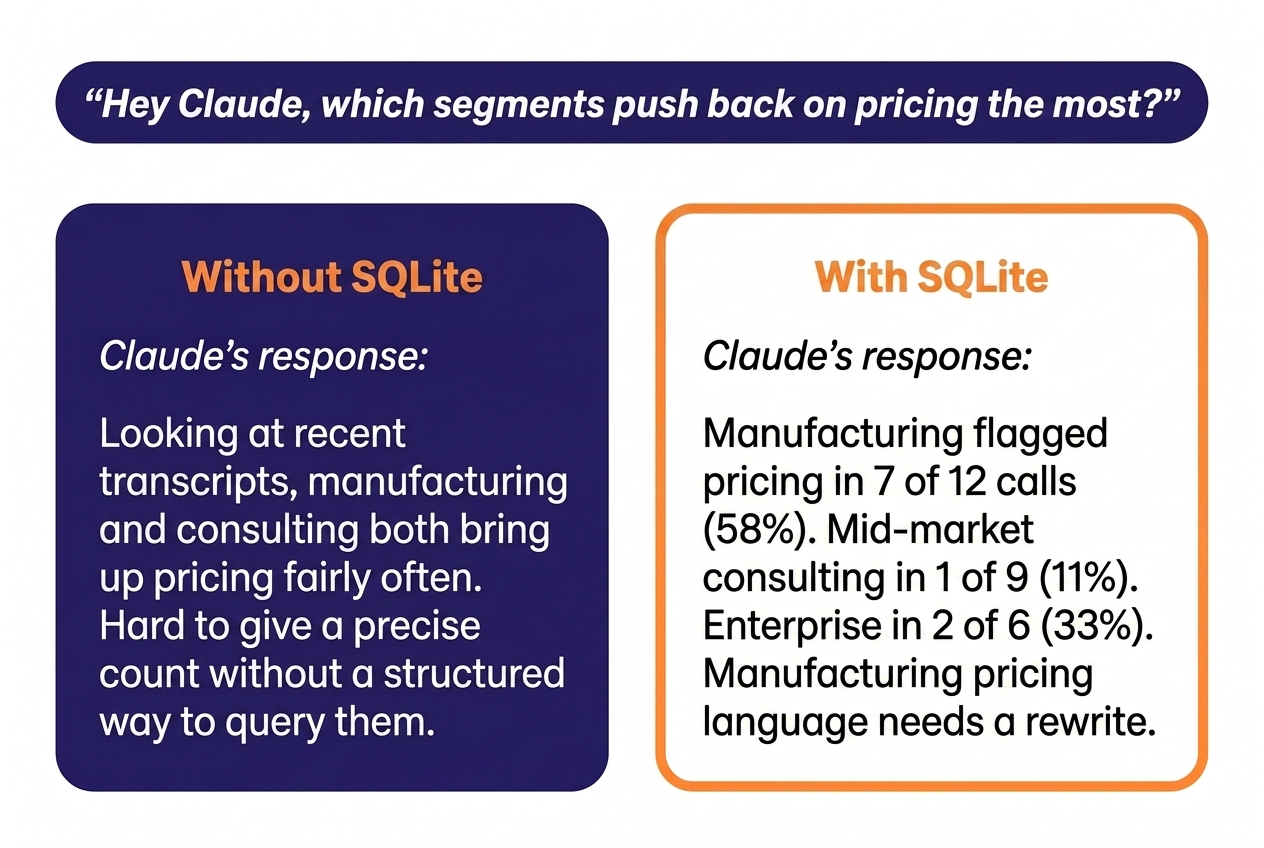
Without this layer. Ask Claude “which segments push back on pricing the most?” with raw transcripts only, and you get a vibes answer based on which transcripts happened to land in context. Ask the same question with a vector DB over the transcripts, and you get the calls that sound like pricing objections — which is not the same set as the calls where pricing was actually flagged.
With this layer. Same question, precise answer: “Manufacturing flagged pricing in 7 of 12 calls last quarter; mid-market consulting flagged it in 1 of 9. Manufacturing pricing language needs a rewrite, mid-market doesn’t.” Same model, same data, but the data is in the shape that fits the question.
How I keep it current. New transcripts get processed by a small extraction routine that pulls the metadata fields and inserts them as rows. The schema gets new fields when the codification work surfaces a new attribute worth tagging. SQLite because it’s queryable from Claude directly, lives next to the markdown layer, and never needs a server.
3. Full-text index for cross-session retrieval
The first two layers solve for the current session: the right context loaded, the right metadata queryable. But there’s a third question they can’t answer: “Where did I work through this same problem before?”
My first attempt was the simplest thing I could build: a session-end hook that ran a lightweight LLM summary of each conversation and saved it as a markdown file. Zero infrastructure, ten minutes to set up. If you’re starting from scratch, this is a reasonable first step — you’ll have a searchable diary of what happened in each session, and it costs nothing.
For my setup — four concurrent clients, hundreds of sessions a quarter, and work where the reasoning chain from one client’s problem often applies to another — the volume outgrew flat summaries within weeks.
But the summaries didn’t scale. You could grep through them — and I did — but grep across hundreds of summary files returns dozens of matches with no ranking, and each match is a few-paragraph summary, not the raw session. The specific detail you need — the exact reasoning chain, the option you ruled out and why, the error message that led to the fix — is often the part the summarizer dropped. The simple thing broke.
I’d built this before reading Jonathan’s “Stop Calling It Memory”, but his argument nails the same instinct: markdown files are configuration, not memory. They work brilliantly as a curated context layer (that’s my entire layer 1), but the moment you try to use them as a growing knowledge store, you’ve built a system that gets slower and less accurate the more you add to it.
Inspired by Chad Piatek’s approach to SQLite+FTS5 session indexing, I replaced those flat summaries with a Conv Memory DB — a SQLite file with FTS5 full-text indexes over my own working history. It indexes Claude Code session transcripts (auto-synced from a local daemon), meeting transcripts, and knowledge files.
FTS5 is the right shape here for three reasons: it’s a SQLite extension, so it runs on the same local database with zero additional infrastructure or cost. It ranks results by relevance (BM25) — unlike grep, which returns every match with no ranking. And keyword retrieval finds what I need without the semantic guesswork of embeddings.
If I ever need semantic search on top, the upgrade path stays local: sqlite-vec adds vector columns to the same database, so you can run both keyword and similarity search without changing infrastructure.
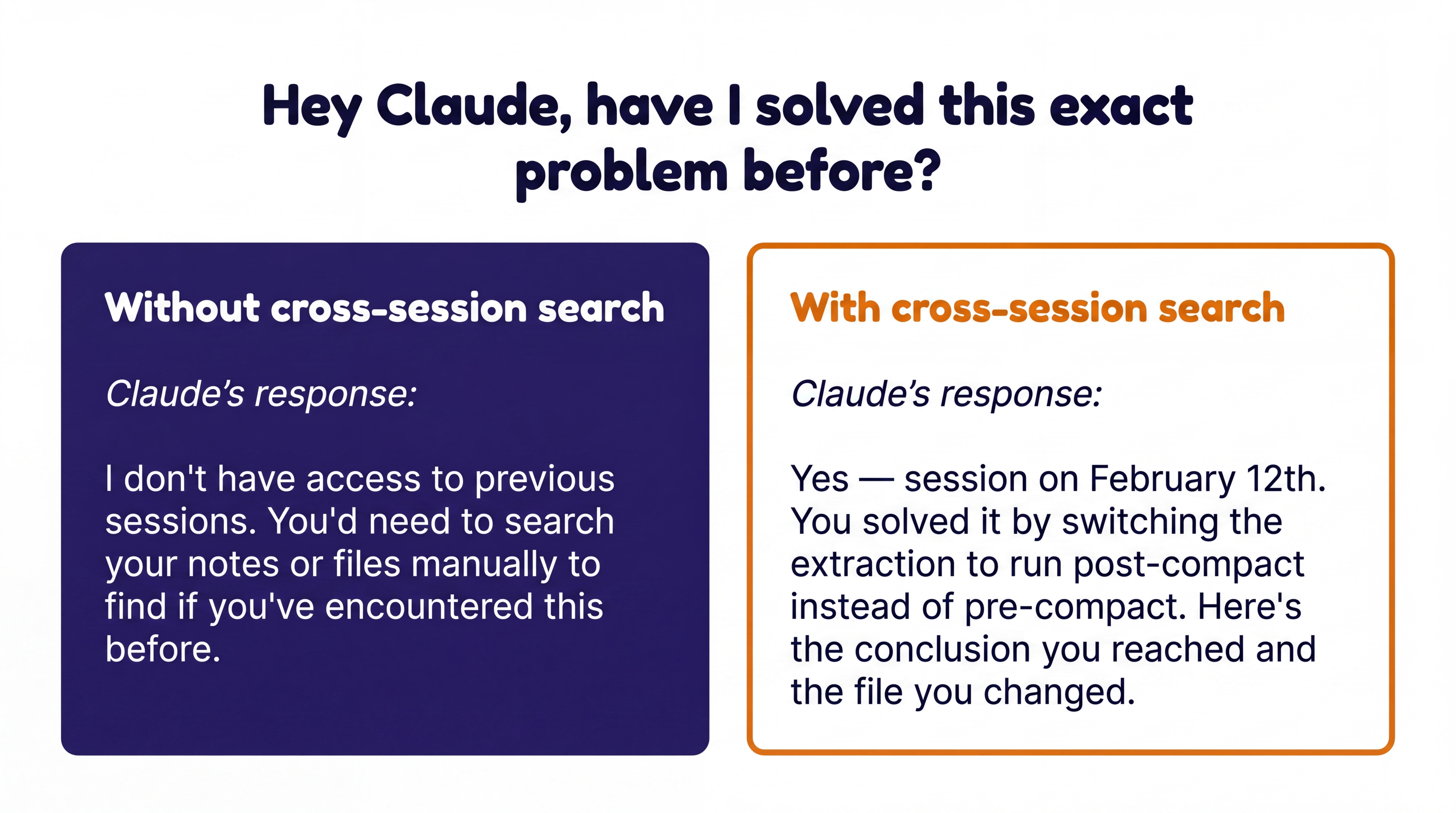
Without this layer. Ask “have I worked through this exact problem before?” and you get “I don’t remember” — or worse, a hallucinated answer based on whatever fragments are still in context from earlier in the session.
With this layer. Same question, precise answer: “Yes — three sessions in February. Here’s the conclusion you reached.” The index finds the sessions by the terms you actually used, not by what sounds similar.
How I keep it current. The daemon syncs every Claude Code session automatically. A separate script indexes new meeting transcripts and knowledge files as they’re added. Both run locally, no hosted service.
How to choose a memory architecture for Claude
None of my three layers is a vector database — not because vector databases are wrong, but because none of the shapes call for one. Several other architectures I’m not running are also right for the right shape:
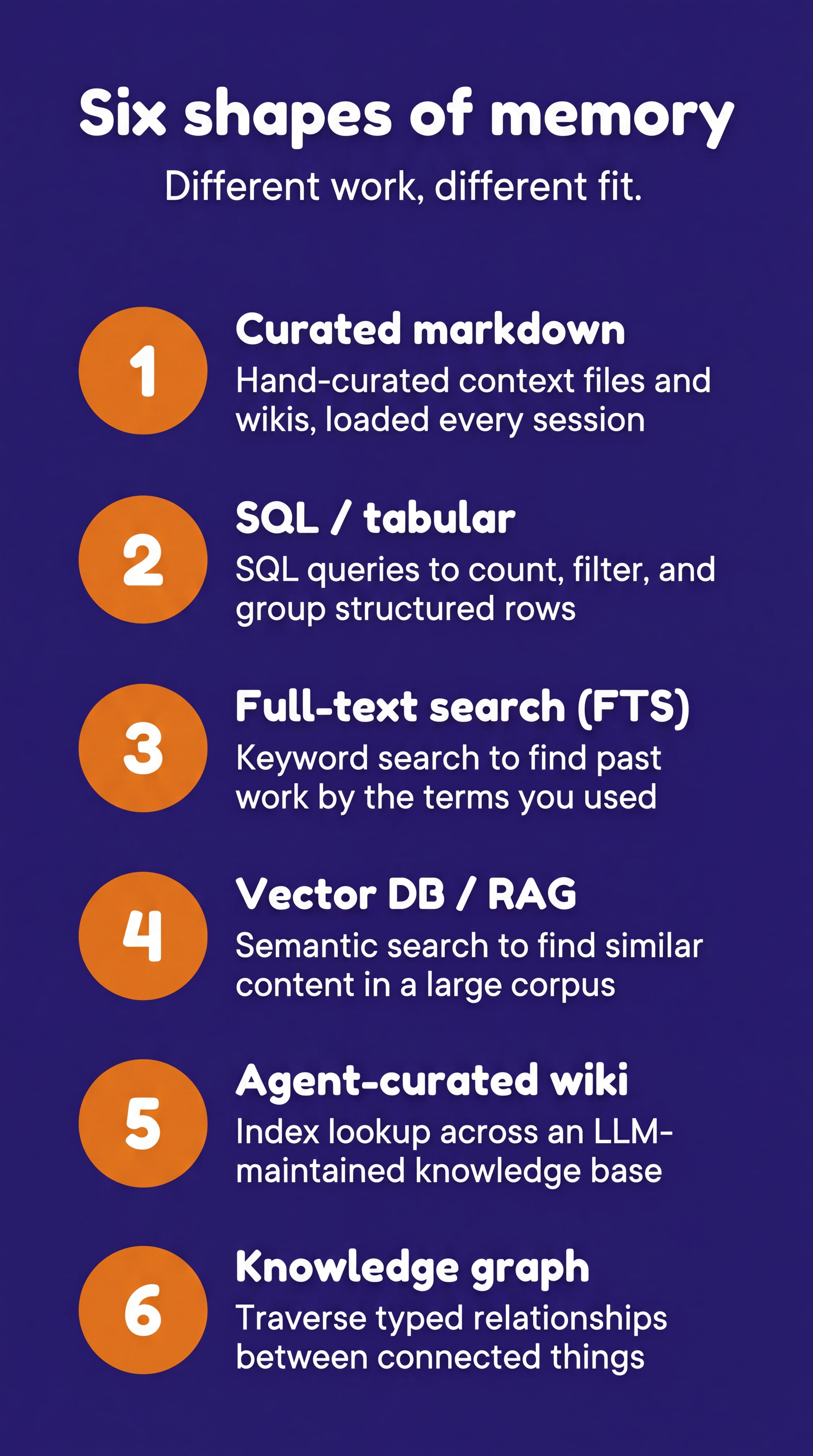
The six above are the most common shapes in plain English. The longer map below adds named examples and the trade-offs that matter, including a few baselines and variants worth knowing about:
| Memory shape | Right when | Wrong when | Examples |
|---|---|---|---|
| No persistent memory (in-context only) | Each session is independent; the relevant context fits comfortably in the prompt; decisions don’t need to compound across sessions | You’re re-explaining the same context every session; output gets worse for it; the time cost of re-explanation outweighs the cost of building a memory layer | Default Claude or ChatGPT without memory features turned on |
| Built-in product memory | You want low-effort cross-session continuity for personal or casual use; you’re comfortable with the product choosing what to remember and how to surface it | You need to inspect, edit, version, or restructure what’s remembered; the product’s view of “important” doesn’t match yours; the trail needs to be auditable for professional work | Claude.ai auto-memory (remembers your role, coding preferences, project conventions); ChatGPT memory (remembers personal facts, communication style, past requests) |
| Hand-curated markdown context | Decisions build on previous decisions; the same fact carries different weight in different contexts; source attribution and trust hierarchy matter; you can hand-prune what goes in | The corpus is too large to curate by hand; freshness changes faster than you can update | ICP definition, business context, and decision log as markdown files Claude loads at session start, plus a deeper queryable wiki (my curated-context layer) |
| Session-boundary automation (mechanism, not a store) | Decisions, open items, and resolved questions need to carry forward between sessions — this is the plumbing that keeps the curated-context layer current | The decision of what to file requires judgment the automation can’t make | Session-end hooks that summarize conversations; mid-session skills that route transcript findings to the right context file; Cole Medin’s memory compiler at the more aggressive end |
| Tabular / SQL | Count, filter, group across structured rows; the questions are precise and known in advance | The questions are about meaning, not match patterns; the data is unstructured prose | SQLite or DuckDB over call transcripts, interview metadata, or campaign results with extracted attributes (my structured-metadata layer) |
| Full-text search (FTS) | Find exact terms or phrases across a corpus you authored; the vocabulary is consistent because it’s your own language; the questions are keyword retrieval, not meaning-based | The corpus uses inconsistent vocabulary across many authors; the questions are about semantic meaning rather than exact phrases; you don’t know what terms to search for | ”I solved a similar problem three months ago — find that session”; “What did I conclude about pricing for manufacturing last quarter?” Searching your own working history by the terms you remember using (my cross-session retrieval layer, built on SQLite+FTS5) |
| Agent-curated markdown wiki | The knowledge base has outgrown what one person can curate, but the content is still prose-shaped — roughly 100+ docs and a few hundred thousand words — and you’re willing to let the LLM do the curation | You need source attribution and trust hierarchy to be human-decided; the locus of curation shifts to the LLM here, and that is the trade-off you’re making | A growing research library where the LLM captures articles, organizes by topic, and maintains an index — Karpathy’s setup runs ~100 articles with LLM-driven lint cycles that find inconsistencies and suggest new entries. My personal research library is a hybrid: Claude captures and indexes, but I gate what goes in |
| Knowledge graph with typed relationships | The relationships between facts are stable and worth encoding as typed edges (causes, fixes, contradicts, supersedes); the work is multi-hop relational reasoning over a structured fact-graph | The relationships are still in flux as data accumulates; the work is mostly prose retrieval and judgment rather than reasoning over edges; the formality of a schema is more overhead than benefit | Following chains of connections: “Who in this org connects to the budget holder?” “If we lose this supplier, which products are affected, and which customers depend on them?” The questions are about tracing paths between things, not counting or filtering. Tools: Mem0 · Zep/Graphiti · Cognee · Neo4j |
| Vector DB / RAG | Find semantically similar content in a large unstructured corpus you can’t pre-curate — retrieval is the work | Decisions need source attribution; structured queries exist; the corpus is small enough for any other shape | Customer support over thousands of help-center articles; cross-codebase semantic code search |
Two rows deserve a second look, because the trade-offs are sharper than the table can carry.
Session-boundary automation is a spectrum. I started with session-end hooks that summarized each conversation, then moved to mid-session routing skills that propose updates to the right files as new facts emerge — I review before applying. Cole Medin’s memory compiler sits at the more aggressive end: it captures every session and lets the LLM decide what’s worth promoting into a wiki. Right when the dark matter — dead-ends, sub-threshold decisions — is worth the noise. Wrong when source attribution decides whether a fact is a conclusion or an input to investigate.
Agent-curated wikis trade curation locus for scale. Andrej Karpathy is explicit: the LLM writes and maintains his wiki, including periodic lint cycles to find inconsistencies. Right for a research library where breadth beats depth. My personal research library is a partial version of this — Claude captures resources, writes metadata, and generates indexes, but I gate what goes in. The per-client wikis stay fully human-curated, because what I choose to leave out is the part that makes the LLM useful.
If my work shifted — a corpus too large to hand-curate, or reasoning over a stable graph of typed relationships — the shape would change, and the tool would change with it. That’s the right reason to reach for something fancier.
The same memory mismatch shows up in GTM stacks
The instinct to over-engineer from the start isn’t a GenAI problem — it’s a human one. B2B SaaS GTM stacks are full of the exact same mismatch.
Companies with 40 customers buying automation platforms built for 40,000. Multi-touch attribution models running over a pipeline you can count on your fingers. Outbound sequencing tools licensed before there’s a validated ICP to sequence against. Dashboarding stacks priced for a reporting team of six, run by a marketing manager who opens them once a week.
The tool isn’t the problem. The mismatch between the tool and the actual work is. The same instinct that makes a non-engineer reach for “vector DB” because it sounds right also makes a five-person GTM team license Clay + Apollo + Outreach + 6sense + Gong before they’ve nailed who they’re selling to. Buying the fancy thing feels like progress. It’s how almost every over-built GTM stack gets its first three layers.
The fix is the same in both places: start by naming the shape of the work, then pick the simplest tool that fits that shape. Add complexity when the simple thing breaks — not before.
Where to start with Claude persistent memory
None of what I run today is the end state. I’ll add what’s needed when the simple thing breaks — probably some of it embedding-based, when a shape actually requires it.
One last honest note: none of this runs itself. Around the three layers sits machinery I haven’t described — behavioral rules that configure how Claude reasons about sources and evidence, enforcement hooks that block specific failure modes before they happen, audit skills that flag when the curated layer has gone stale or the workflow has drifted, and a mid-task checkpointing system for work that gets interrupted before it’s finished. None of these are the memory itself — they’re what makes the memory trustworthy and maintainable. The memory architecture is three shapes. The discipline layer around it is more.
No memory system, no matter how well architected, can replace the human judgment that decides what to codify, what to leave out, and when something’s gone stale. The architecture does the heavy lifting — once a fact is curated, it stays put; once a decision is filed, it carries forward — but the quality depends on showing up to maintain it.
I don’t use AI to replace thinking. I use it to never think the same thing twice. That’s only possible if the memory layer underneath is shaped for the kind of thinking you actually do — and if I keep showing up to maintain it.
Persistent memory is one layer of the GTM context OS that lets a fractional GTM lead run multiple B2B SaaS engines from inside Claude Code. For how the whole thing fits together, see also the AI workflows that ride on top of it.

Anna Ursin
Fractional GTM lead for B2B SaaS companies at €1M–10M ARR. I help founders build go-to-market engines that actually connect to pipeline — instead of random acts of marketing. More about me
