In this article:
- 1. Monitoring competitors and market signals
- 2. Content production — from context to live page
- 3. Making sense of data (CRM, pipeline, campaigns)
- 4. Building outbound lists that actually match the ICP
- 5. The daily ops that eat your calendar
- 6. On-demand research and data pulls
- How this post was written
I don’t use AI to write my strategy decks. I use it to do the tedious, repetitive work that used to eat half my week — so I can spend that time on the actual thinking.
As a fractional GTM consultant, I work with 3–4 B2B SaaS clients simultaneously. That means context switching between different ICPs, messaging frameworks, competitive landscapes, CRM data, and content pipelines — every day.
The bottleneck was never strategy. It was the manual work surrounding it:
- Monitoring competitors across multiple sources
- Enriching prospect lists one company at a time
- Analyzing CRM data deal by deal or email sequence performance campaign by campaign
- Getting content from a Google Doc to a live page
These are just some of the workflows I’ve built over the past few months to handle that grunt work. None of them are impressive demos. All of them save me real time every week.
The examples below are from real client work. All identifying details have been anonymized.
1. Monitoring competitors and market signals
The problem: I used to check competitor websites, news, and review sites manually. For one client, I was monitoring 13 competitors across three depth tiers. That’s a lot of tabs.
What I built: An automated monitoring pipeline using n8n (self-hosted workflow automation), changedetection.io (self-hosted website change monitoring), and a self-hosted search engine (SearXNG) for news discovery.
How it works:
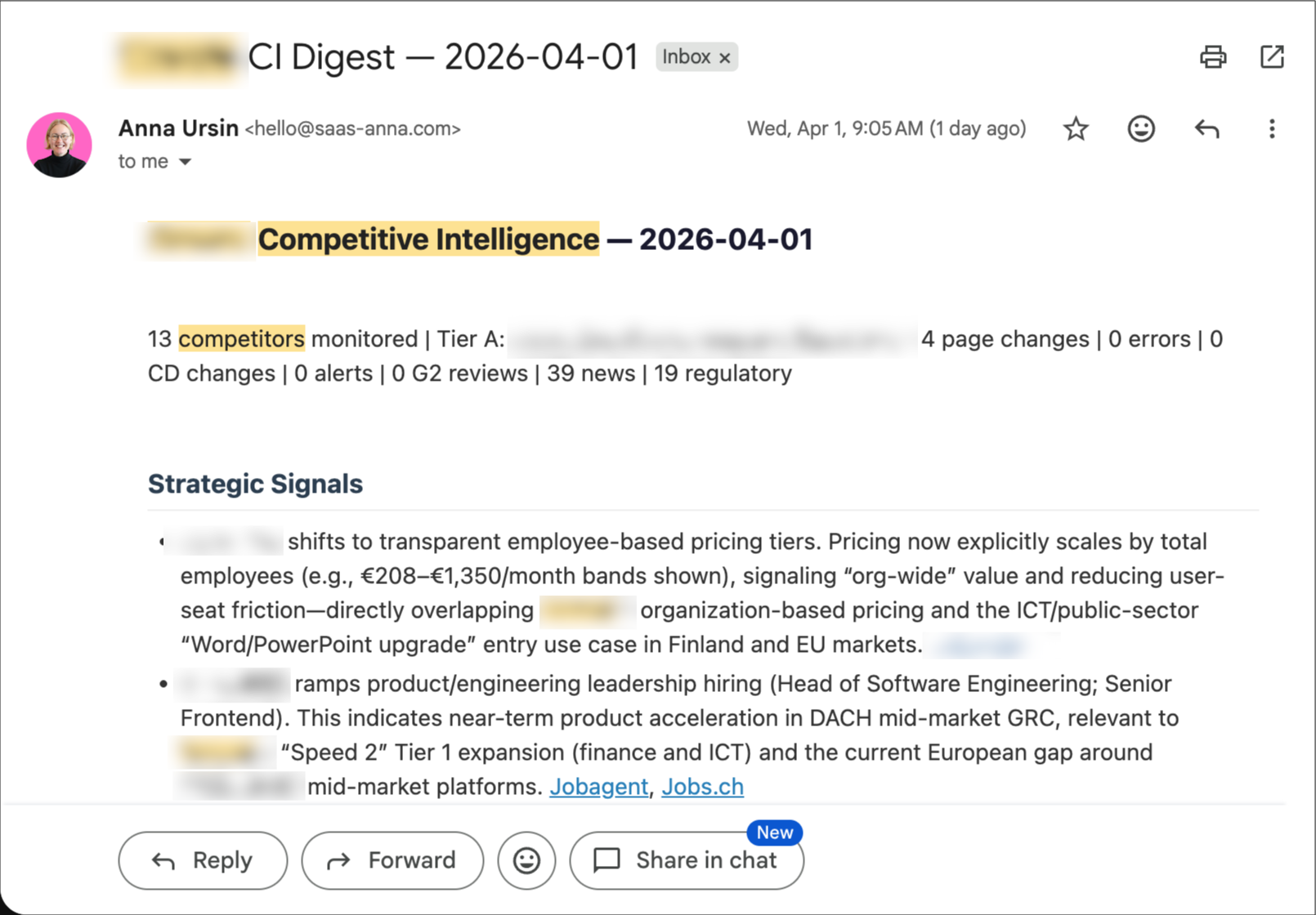
Every two weeks, the system runs seven parallel data collection branches:
- Direct URL monitoring — tracking competitor pages and release notes for content changes via MD5 hashing
- Website change detection — a self-hosted changedetection.io instance watching for visual and structural changes
- Review feeds — G2 review feeds for five key competitors
- News search — SearXNG queries with different depth per competitor tier
- Google Alerts and Reddit/HN mentions — captured via Gmail labels
- Regulatory landscape — monitoring regulatory developments relevant to the client’s market
Before any of this reaches the AI, a pre-filter strips obvious noise. Then an LLM analyzes the remaining signals with the client’s competitive context loaded — it knows who the competitors are, what they claim, and what our client’s positioning is. The output is a structured digest: strategic signals at the top, notable changes, regulatory developments, and background noise separated clearly. Delivered via email, ready to review in five minutes.
The lesson I almost learned too late: When I first built this, it looked great. Professional emails arrived on schedule. But when I actually audited the inputs, 55% of the signals were noise — real estate articles, cricket match results, completely irrelevant content. Seven of 24 monitored URLs were returning 404 errors. Silently. The AI still produced a beautiful-looking email from garbage data. “An email was sent” is not a quality metric. I rebuilt the entire pipeline with tighter source queries and proper input validation. The current version has 0% noise in output.
I use the same pattern for content curation. A separate pipeline monitors a newsletter I follow. It fetches each new post, scores it for relevance to my work (using Gemini Flash — free tier), and sends me a Telegram notification only if the score is high enough. I can reply “yes” from my phone and the article gets queued for deeper processing in my next work session. Same principle: AI as information filter, not information generator.
The automated monitoring is only half of it. Before turning it on, I run a baseline competitive analysis — a deep dive into each competitor’s positioning, messaging, pricing, and active ad campaigns across Meta, LinkedIn, and Google. That baseline becomes the context the monitoring system uses to evaluate new signals. Without it, the AI wouldn’t know what’s a meaningful change versus business as usual.
The cost: $0 for infrastructure (everything self-hosted). The only cost is the API call for the LLM analysis. I open-sourced the competitive monitoring workflow if you want to see the architecture. Fair warning: it uses a lot of custom Code nodes — that’s what Claude Code defaults to when building n8n workflows. It’s not the prettiest architecture, but it works and it’s easy to troubleshoot when it doesn’t.
2. Content production — from context to live page
The problem: Writing a product page or blog post for a client used to involve opening five tabs: the product docs, the help center, the messaging framework, the competitor analysis, the SEO brief. Hand over for a freelancer or write yourself, hand off for review, get the content into the CMS. Each step had manual friction.
What I built: A content pipeline where AI draws from a living knowledge base to produce content, adds context for collaborators, and publishes directly to the CMS.
How it works — two paths, same foundation:
Whether I’m writing the content myself or handing it off to a freelancer, the starting point is the same: the AI has real-time access to a living knowledge base with everything it needs.
Path 1: Writing with full context. When I write a product page for a client, the AI has real-time access to:
- The client’s up-to-date product documentation and help center
- The codified ICP, messaging framework, and competitive positioning
- Search Console and SEMrush data
- The live website and sitemap
A quality product page takes about 20 minutes. Not because the AI “just writes it” — but because it doesn’t need me to paste context every time. The knowledge base stays current because new learnings (a use case from a sales call, a shift in competitive positioning, a product update) get codified as they happen.
This applies to any content that needs to be grounded in the client’s reality — product pages, blog posts, ad copy, landing pages, outbound sequences, campaign briefs. The underlying pattern is the same: the AI draws from a living knowledge base instead of my memory.
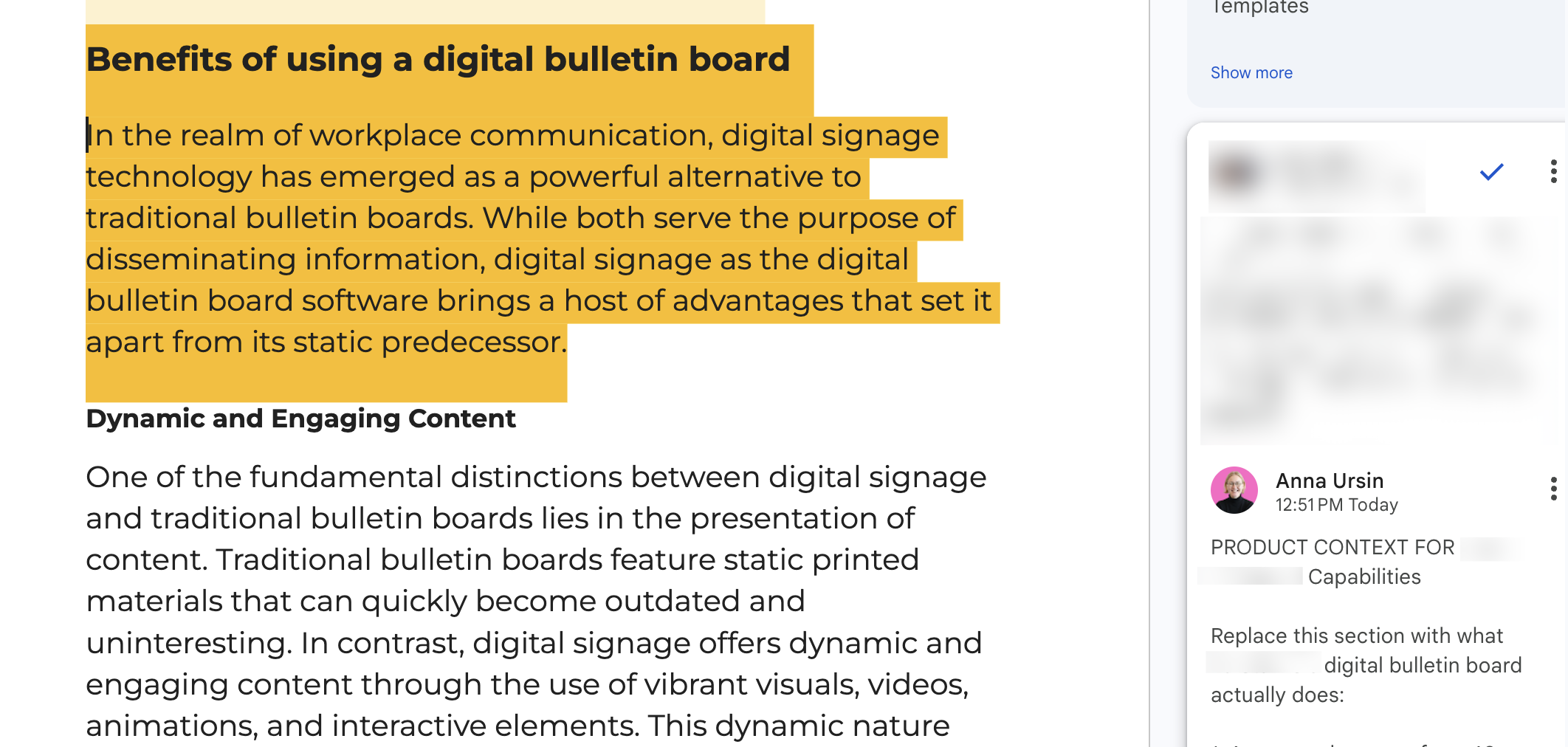
Path 2: Contextual handoffs to collaborators. One client has a content freelancer who writes blog posts based on SEO briefs from the SEO partner. The briefs arrive as Google Doc comments. I built a workflow where Claude reads the blog draft, cross-references it against the product documentation and help center, and adds Google Doc comments with product context — things like “the product doesn’t actually have this feature, here’s what to write instead” or “here’s the Help Center link for this capability.” The freelancer gets actionable product context without needing a 30-minute call with the product team for every post.
Then: Publish to CMS. Once content is ready, it goes directly to WordPress (via API) or Webflow (via their CMS API). For WordPress, the workflow handles page creation, parent-child hierarchy, SEO meta fields, slug generation, and featured images. Draft mode first — nothing goes live without a human review. But the 15-minute copy-paste-format-publish dance is gone.
Once the page is live, the system also handles internal linking — adding links to the new content from existing pages across the site.
The full pipeline — from “we need a page about this feature” to a draft live on the CMS — takes about 30 minutes. The manual version used to take most of a morning.
3. Making sense of data (CRM, pipeline, campaigns)
The problem: Most CRM data is messy. Fields are inconsistently filled. Deal stages mean different things to different salespeople. And nobody has time to export 500 deals to a spreadsheet and cross-reference them with anything.
What I built: Analytical workflows that pull CRM data, clean it, and find patterns that inform the GTM strategy.
Two real examples:
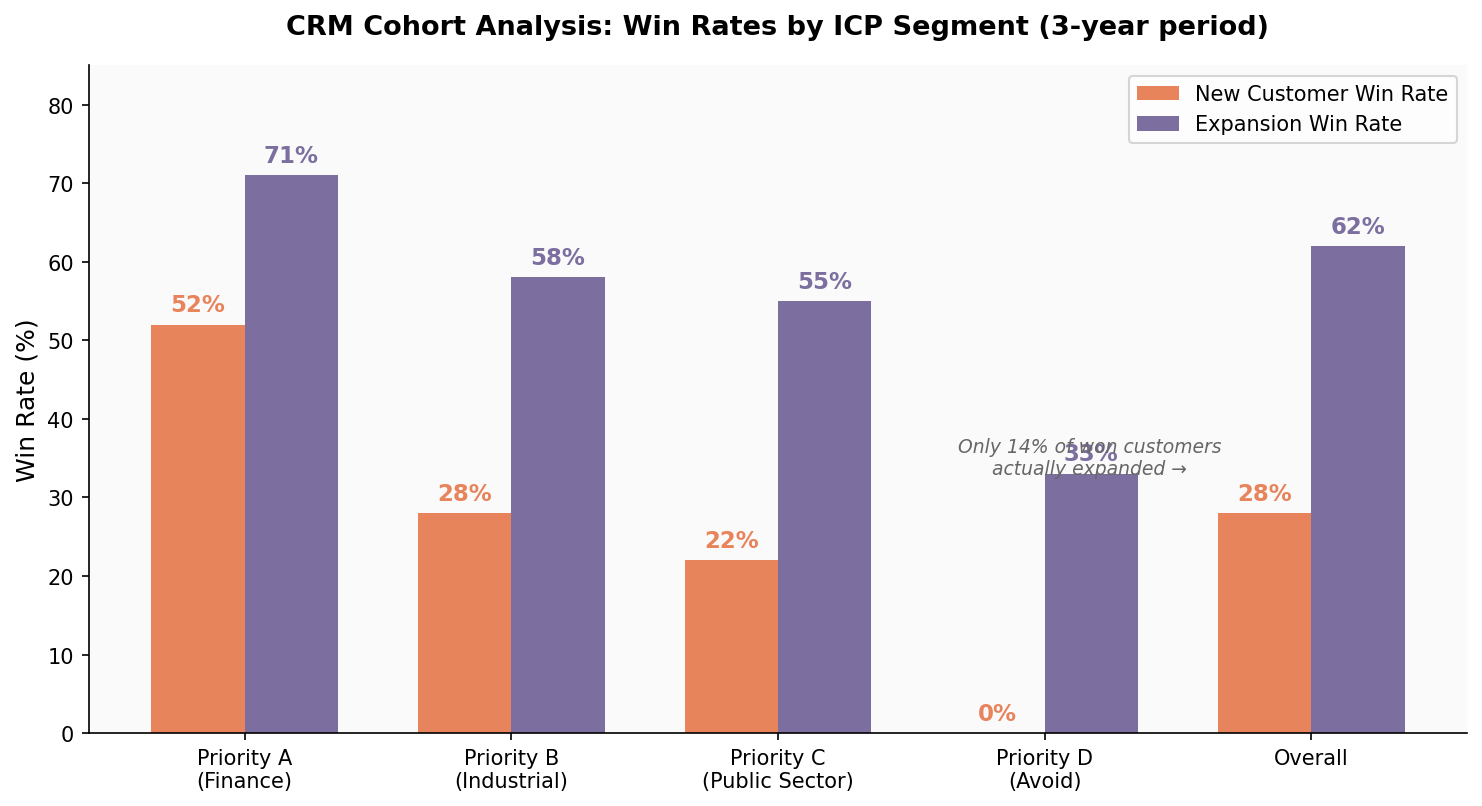
Client A: A CRM cohort analysis. A few hundred new customer acquisition deals and another few hundred customer success expansion deals over a few years. The AI enriched company data for better segmentation, segmented deals by the ICP priority tiers we’d defined in earlier workshops, then calculated win rates per segment, and flagged any anomalies.
The biggest finding: the company believed in a “land and expand” motion — start small, grow the account. Even though new sales win rates were excellent compared to industry averages, the data told a different story on expansion: only 14% of won customers actually expanded. That single finding changed the sales strategy from “get a foot in the door” to “sell the right scope upfront.”
Client B: Deal analysis cross-referenced with sales call transcripts. Here we combined CRM deal data with an analysis of about 500 qualifying sales call recordings. The deal data showed a 24% inbound win rate versus 10% outbound.
The transcript analysis (done in two passes — a fast model for segmentation, then a more capable model for deep extraction across 9 research dimensions) revealed that 96% of sales conversations centered on one capability, while the product’s biggest differentiator was barely mentioned. The outbound messaging was pushing into the most crowded competitive space while ignoring uncontested territory.
Neither of these analyses required custom code or a BI tool. They required structured data access, a clear analytical framework (the ICP model and the messaging canvas), and the patience to look at hundreds of deals individually rather than just top-line averages.
What made the AI useful here: It’s not that AI can do math. It’s that it can hold the full context — the ICP definitions, the competitive landscape, the messaging framework — while processing each deal. A human looking at deal #347 wouldn’t remember what the positioning canvas says about Segment B. The AI does.
4. Building outbound lists that actually match the ICP
The problem: Two parts. First, the client had prospect lists with company names but no website URLs — making it impossible to enrich further or match against other databases. Second, the client had 78 outbound email sequences running across 9 senders with no systematic analysis of what was working.
What I built:
A note on tooling: in production, I typically use my clients’ paid tools — their CRM, their enrichment platform, their outbound stack. But when I’m experimenting with a new approach or building something from scratch, I reach for a DIY setup: self-hosted search, open APIs, Python scripts. The examples below are from that DIY side — they show the pattern, not the only way to do it.
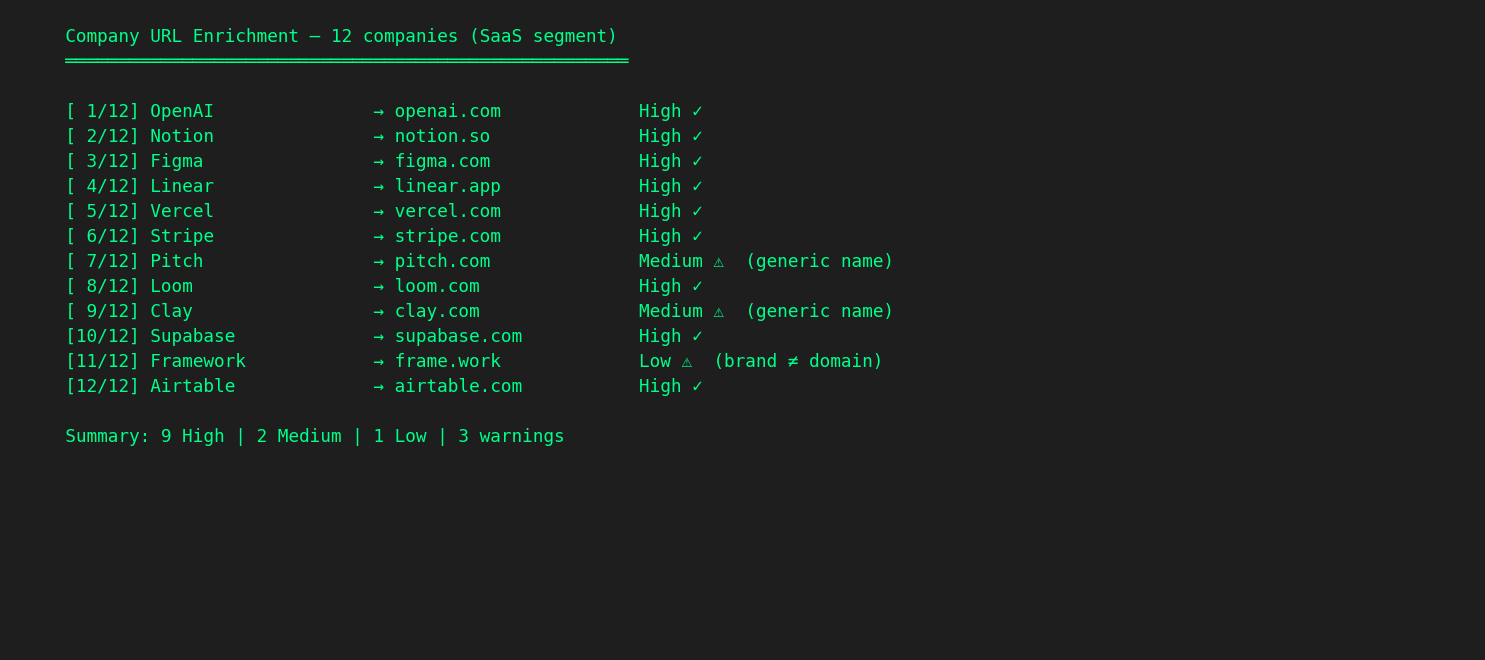
Part 1: Company URL enrichment at scale. A Python script that takes a CSV of company names, runs each through a self-hosted search engine (SearXNG — no API keys, no rate limits, no per-query cost), scores the domain-name similarity of each result, filters out social media and directory sites, and outputs an enriched spreadsheet with confidence levels (high/medium/low).
For distinctive company names, the match rate is above 80%. For generic names, it drops — and the script flags those as low-confidence rather than guessing. The enriched URLs then go into Apollo (or whatever tools you’re using) for further enrichment (employee count, industry, tech stack). Between the script and Apollo’s People Search API, we validated tens of thousands of contacts against the ICP criteria, with precision and recall metrics calculated at each step.
It’s not magic. It’s a for loop, a search query, and a string similarity score. But doing it manually for 24,000 contacts would be insanity.
Part 2: Email sequence analysis. The AI pulled roughly 80 sequences (thousands of emails) spanning nearly two years from the Apollo API. Quantitative analysis: open rates, reply rates, bounce rates — segmented by sequence, by sender, by time period. Qualitative analysis: the AI actually read the email copy, classified reply sentiment (only 12% of replies were positive), and compared the messaging against the positioning framework we’d built during onboarding.
The leading indicators told the rest of the story: open rates had collapsed from healthy levels to near-zero in recent sequences, bounce rates were well above industry thresholds, and domain reputation showed signs of damage. Combined with the messaging gap — the outbound emails were competing on the most crowded capability while completely ignoring the product’s strongest differentiator — we now had a clear picture of what to fix, and in what order: infrastructure first, then messaging, then scale.
None of this was visible from open rate dashboards. It only became visible when you cross-reference email copy with the competitive positioning analysis and look at deliverability metrics across the full sequence history.
5. The daily ops that eat your calendar
The workflows above are project-level — you set them up, they run. But I also have a set of smaller tools I reach for almost every day. Each one replaces 15–30 minutes of manual work.
Meeting prep on autopilot. Every morning, I run a calendar scan that looks at my day, categorizes each meeting (client weekly, workshop, sales prospect, internal), and auto-preps the ones that need it. For each meeting, it pulls the client’s current context, recent transcript summaries, open action items, and any unresolved questions. For sales calls with new prospects, it runs a quick web search on the company. I walk into every meeting having “reviewed everything” — without actually reviewing anything manually.
Action items that don’t fall through cracks. I have multiple client calls in a week. Most people rely on their AI note-taker’s built-in summaries. I take it a step further: my agent processes all transcripts across all clients, extracts action items, checks which ones are already done, and writes a structured todo list to a centralized Obsidian vault. It also pulls my calendar for the next seven days to flag items with upcoming deadlines. One place, all clients, always current.
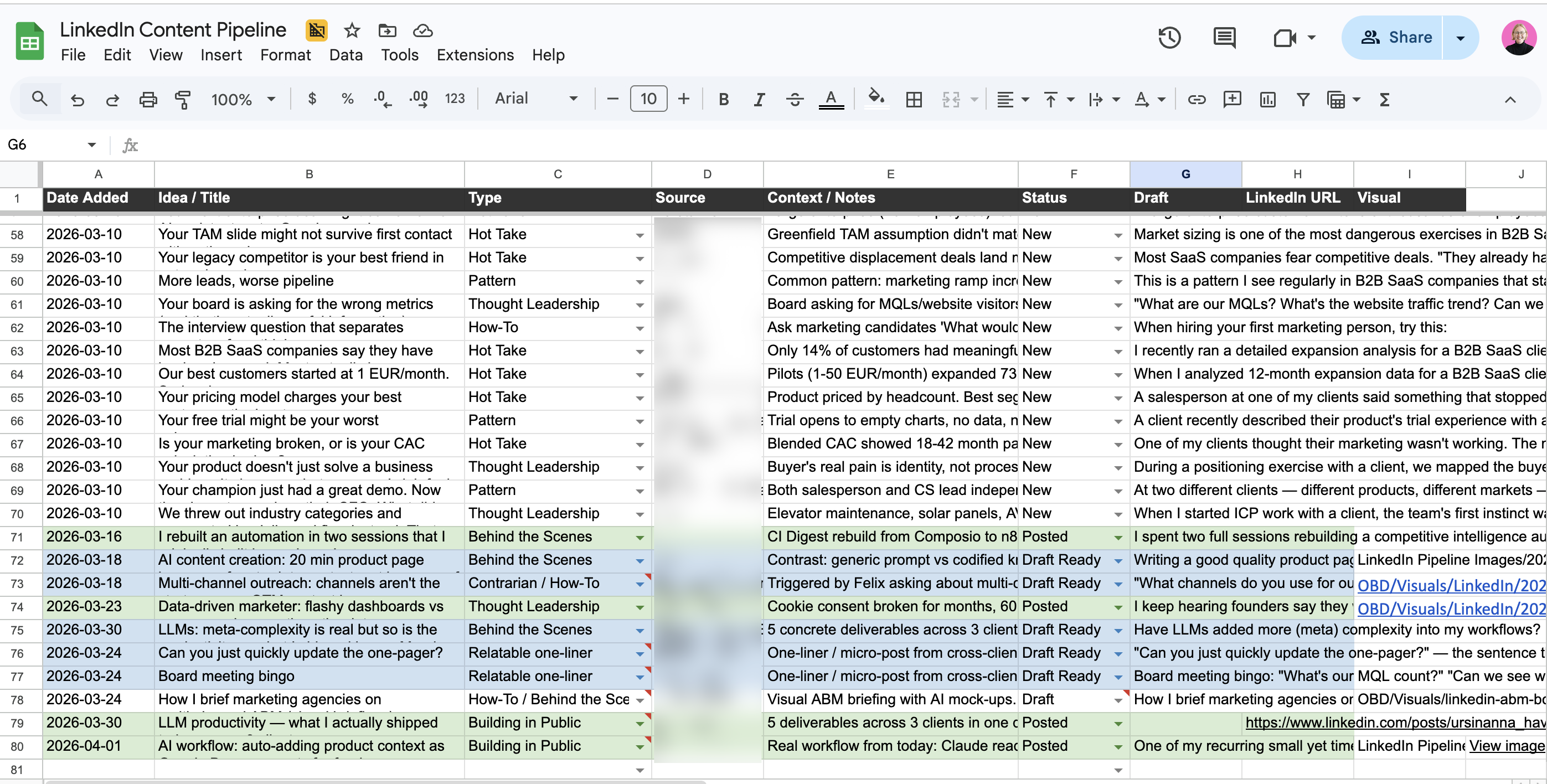
LinkedIn content from client work, not from staring at a blank page. After processing a batch of meeting transcripts, I (manually — could be automated) run a skill that mines them for LinkedIn post ideas — customer pain points, patterns I’m seeing across clients, misconceptions worth addressing. It categorizes ideas by strength (unique cross-client insight vs. strong single example) and adds approved ones directly to my content pipeline spreadsheet. When it’s time to write, the ideas are already there with context attached.
Writing and visuals in one flow. The LinkedIn post skill has two modes: draft from raw notes (I dictate the core idea, it structures and writes in my voice) or cleanup (I’ve edited a draft, it does minimal grammar fixes only). It’s informed by a performance analysis of 729 past posts — so it knows what formats and lengths tend to perform. For visuals, I generate images directly from Claude Code using the Gemini image generation API (Nano Banana) with my brand guidelines pre-loaded.
All of these daily tools are orchestrated through Claude Code — they’re custom skills. The system already has my client context, my preferences, and my style loaded, so each skill starts from a position of knowledge rather than a blank slate.
6. On-demand research and data pulls
Some small tasks don’t need a recurring workflow — they need a tool I can point at a source and get structured data back.
LinkedIn post performance analysis. An Apify-based scraper that pulls posts, comments, and reactions for any LinkedIn profile. I can filter by date range, limit to recent posts, and get everything as a CSV. Cost is about $2 per 1,000 items. I used this to analyze 729 of my own posts to figure out what formats, topics, and lengths actually drive engagement — which now informs how the LinkedIn writing skill works, and also to inform my clients’ LinkedIn strategies.
YouTube video processing. When I find a relevant conference talk or industry video or want to source my customers’ existing content assets for repurposing ideas, I don’t watch it and take notes. A script extracts the transcript (using yt-dlp and YouTube’s caption data — free, no API key), and I can process it in four modes: quick summary, structured takeaways, raw transcript saved to file, or deep analysis with critical assessment. I can also frame the analysis through a specific client’s context — “what’s relevant here for Client A’s positioning?”
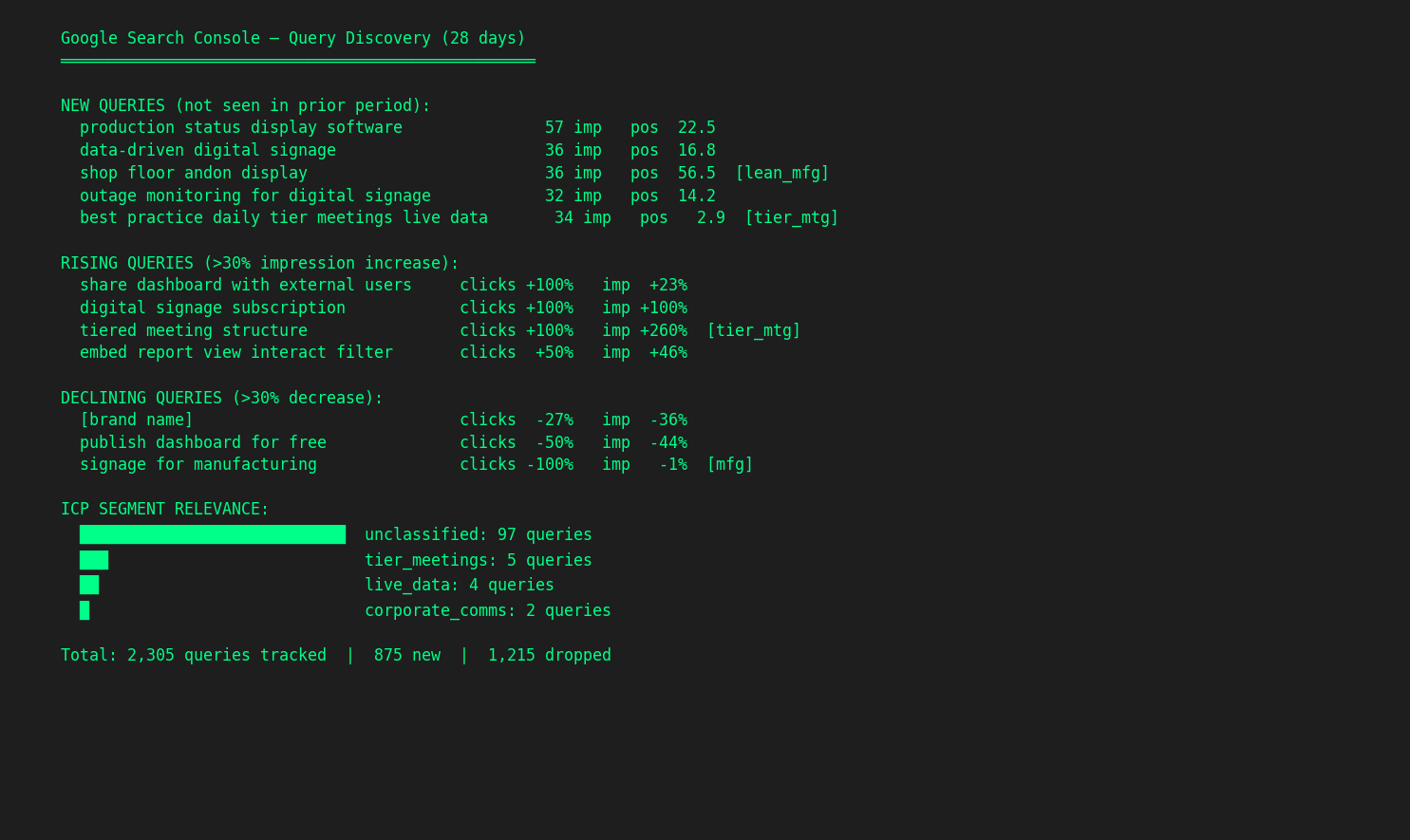
Search Console analytics across clients. A Python module that queries Google Search Console for all my clients with pre-configured ICP-specific keyword segments. Instead of logging into GSC four times and manually filtering, I run gsc.discover() to see new, rising, and declining queries across the portfolio, or gsc.focus() to track how ICP-relevant keywords are trending. The segments are defined once per client (based on the ICP work from onboarding) and every query after that is pre-filtered.
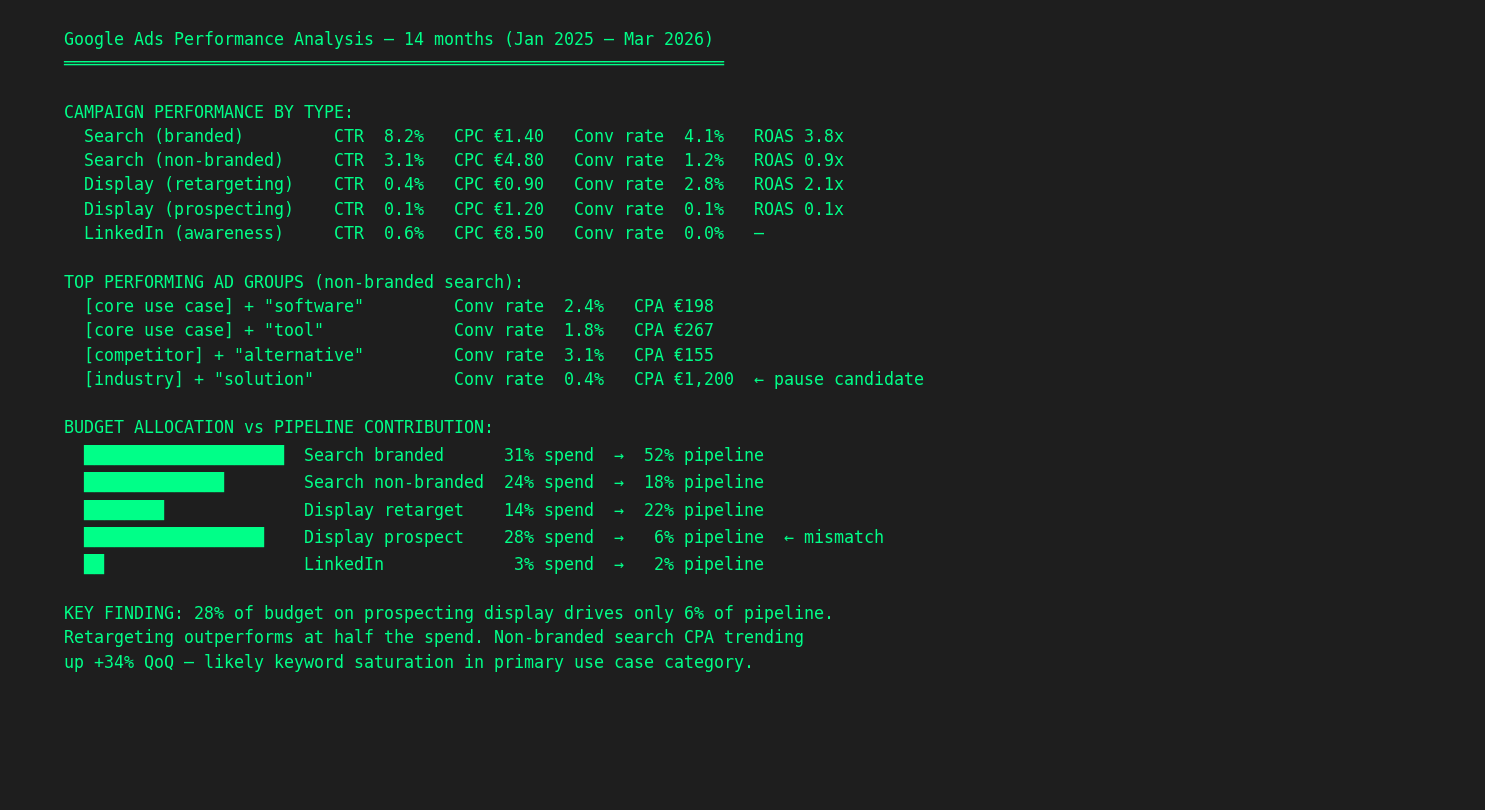
Google Ads performance analysis. I exported 12 months of Google Ads data. In one session, the AI processes every campaign, ad group, and keyword — CTR, CPC, conversion rates, ROAS — broken down by campaign type (branded search, non-branded, display retargeting, display prospecting, LinkedIn). It maps budget allocation against pipeline contribution and flags mismatches. In one case, 28% of budget was going to prospecting display that drove only 6% of pipeline, while retargeting outperformed at half the spend. That finding was invisible in the Google Ads dashboard because nobody had cross-referenced campaign spend with actual pipeline data. The AI does it because it has the CRM context loaded alongside the ad data.
Competitive deep dives. When a client needs a competitive analysis beyond what the automated monitoring catches, I run a skill that does a full investigation: website positioning, messaging analysis, pricing structure, and ad library data from Meta, LinkedIn, and Google. It pulls all of this into a structured report with comparison tables. What used to be a full day of browser tabs and screenshots is now a focused session.
What these have in common
None of these workflows involve AI “writing content” or “replacing a team member.” They automate the manual, repetitive, data-heavy work that surrounds strategic decisions:
- Monitoring that would otherwise require checking 30 sources manually
- Content production that would otherwise require copy-pasting context from five different documents
- Data analysis that would otherwise require exporting CSVs and building pivot tables for hours
- Enrichment that would otherwise mean manual Google searches, one company at a time
- Research that would otherwise mean a day of browser tabs and manual note-taking
- Project management that would otherwise mean re-reading transcripts and manually tracking who agreed to do what
The time savings are real — I estimate these workflows save me 10–15 hours per week across clients. But the bigger impact is quality. The competitive digest catches signals I’d miss. The content is grounded in current product docs, not my memory. The CRM analysis looks at every deal, not a convenient sample. The meeting prep means I never walk in cold.
How this post was written
This post is itself an example. Here’s what actually happened:
I dictated the topic and rough ideas into Claude Code. It searched my scripts folder, skills catalog, MCP and API integrations, client context files, and LinkedIn content pipeline to find concrete examples of what I’ve built. It pulled the specific numbers and details from the actual project files, not from my memory.
I shaped the structure through conversation: which sections to combine, what angle to take, what to leave for a separate post. The AI drafted, I redirected, it revised. The screenshots were a mix: some captured automatically via browser automation (the Gmail digest, the Google Doc comments), some generated as anonymized visualizations (the CRM chart, the terminal outputs).
The draft was saved as a .md to Google Drive synced locally. A future blog post idea was filed as a GitHub issue. The final version — images, metadata, and all — was pushed directly to GitHub from Claude Code and deployed automatically to the live site via Vercel. No copy-pasting into a CMS, no manual file uploads. The whole process — from “I want to write about practical AI workflows” to a live post — took one session, and I created this in between customer work.
The irony isn’t lost on me: writing about AI workflows using AI workflows. But that’s kind of the point. These tools aren’t theoretical. They’re what my actual workday looks like.
What’s next
I’m working on a companion post about the meta-layer that makes all of this possible: how to build and maintain a persistent context system where AI corrections compound across sessions, knowledge stays current through health checks, and you can semantically search hundreds of past work sessions. It’s the infrastructure underneath — less flashy than the workflows, but it’s what makes them reliable instead of fragile.
If that sounds interesting, follow me on LinkedIn where I share these building-in-public updates as they happen.

Anna Ursin
Fractional GTM lead for B2B SaaS companies under €5M ARR. I help founders build go-to-market engines that actually connect to pipeline — instead of random acts of marketing. More about me